BanglarBhumi Land Records
Complete 2026 Guide
Step-by-step instructions for searching khatian, downloading e Porcha, applying for mutation, paying Khajna, and navigating West Bengal's official land records portal.
Browse All Guides
What is BanglarBhumi (and why it matters in 2026)
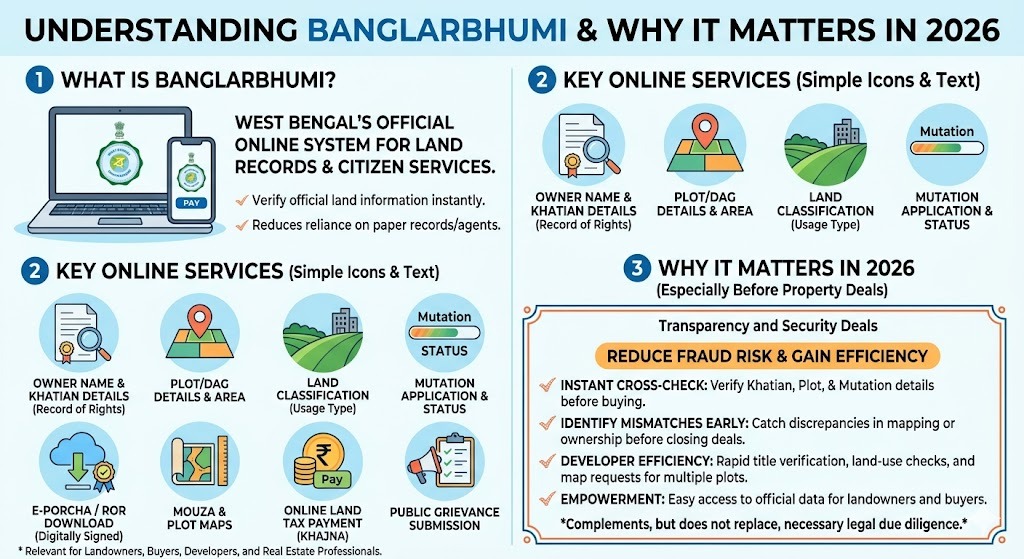
BanglarBhumi is West Bengal's official online system for land records and citizen land services. Instead of depending only on paper records or agents, you can verify key information online, including:
- Owner name (as per record)
- Khatian number details
- Plot or dag details and area
- Land classification (use type)
- RS LR mapping (old vs current dag references)
- Mutation application and status
- e Porcha or RoR download (digitally signed where available)
- Mouza and plot map requests
- Land tax payment (Khajna)
- Public grievance submission and tracking
- Indo-Bangladesh border demarcation updates for the relevant districts
While individual landowners and buyers are the primary users, BanglarBhumi is equally useful for small developers, property consultants, and real estate professionals who need to verify multiple plots quickly.
For developers, the portal allows rapid title verification across multiple khatians, land-use classification checks before acquiring agricultural land for construction, and map requests to confirm boundaries before site surveys.
Why I recommend using BanglarBhumi before any property deal
When you are buying land, the fastest way to reduce fraud risk is to cross-check:
- Khatian and plot details
- RS LR linkage
- Mutation status
- Map boundaries (mouza/plot map)
It does not replace legal due diligence, but it helps you catch obvious mismatches early.
BanglarBhumi portal overview (quick table)
| Portal name | BanglarBhumi (West Bengal Land Records Portal) |
| Purpose | Online access to land records and citizen land services |
| Launched by | Government of West Bengal |
| Managed by | Land and Land Reforms and RR and R Department |
| Main services | Khatian plot info, RS LR info, RoR/e Porcha, mutation, conversion, mouza maps, Khajna, grievances |
| Languages | English, Bangla, Hindi |
| Mobile app | Jomir Tothya (Android) — quick access to records, RS LR, mutation status, stamp duty calculator |
| Official site | banglarbhumi.gov.in |
Important BanglarBhumi services (with what you will actually use them for)
This is the practical shortcut list I share with people.
| Service | What it does | Login needed? | Output |
|---|---|---|---|
| Khatian and Plot Information | Ownership and plot details check | Often no for basic viewing, yes for advanced services | On screen record details |
| Know Your Property | Valuation related checks and property info | Usually yes | Property information display |
| RS LR Information | Matching RS dag with LR dag | No or limited login depending on feature | RS LR mapping details |
| Mutation Application | Ownership update after sale/inheritance | Yes | Application number and receipt |
| Mutation Status | Track mutation progress | May require login | Status on screen |
| RoR Request | Record of Rights request | Yes | Reference number, downloadable document when approved |
| e Porcha download | Certified RoR copy | Yes usually | PDF download |
| Mouza Map Request | Plot boundary and mouza sheet map | Often yes | Map request and downloadable map |
| Fees Payment (Khajna/others) | Pay dues and service fees | Yes | Payment receipt, GRN |
| Public Grievance | Complaint for correction or service delay | Not always but details needed | UPN number for tracking |
Who can access BanglarBhumi?
Basic access (most people)
You can usually view general land record information from the citizen services section with district block mouza and plot or khatian details.
Registered users (recommended)
To apply for services like mutation, conversion, RoR request, certified copies, map requests, and online payments, you should register and log in.
How to register on BanglarBhumi (2026 step by step)
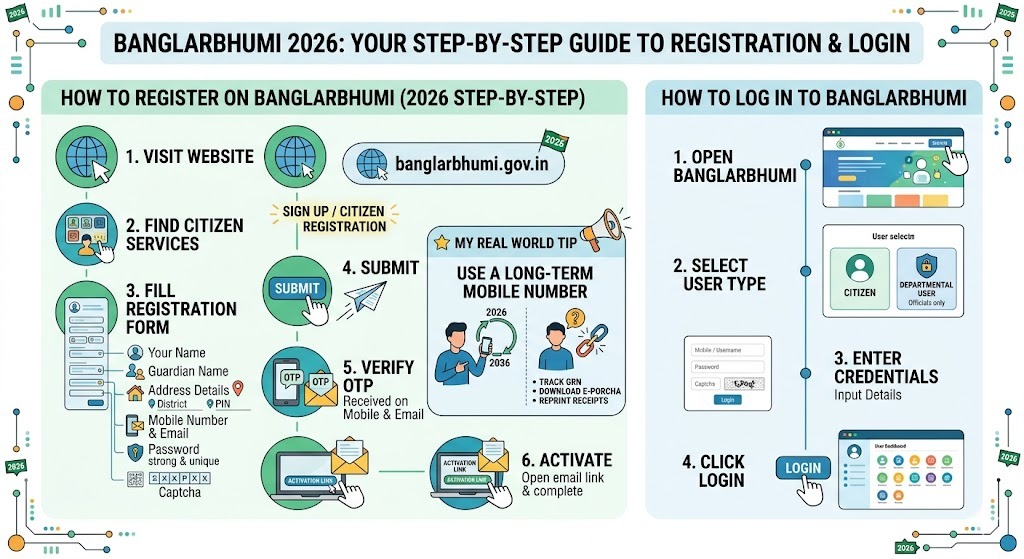
- Go to banglarbhumi.gov.in
- Find Citizen Services and choose Sign Up or Citizen Registration.
- Fill the registration form:
- Your name
- Guardian name
- Address details (district, PIN, etc.)
- Mobile number and email
- Password (keep it strong and unique)
- Captcha
- Submit
- Verify OTP: You may receive OTP on mobile and/or email.
- Activate: If an activation link is sent to your email, open it and complete activation.
How to log in to BanglarBhumi
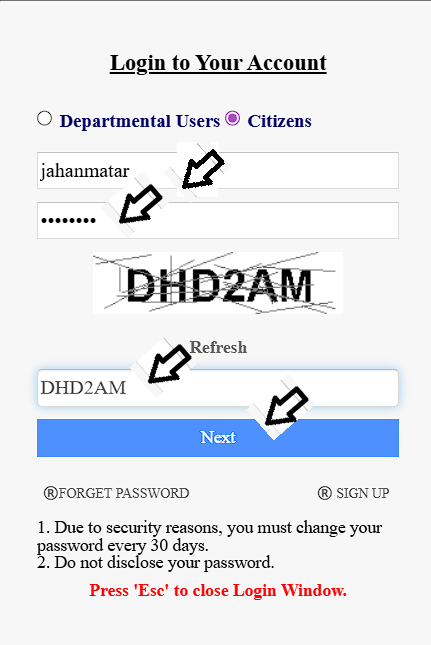
- Open banglarbhumi.gov.in
- Click Sign In
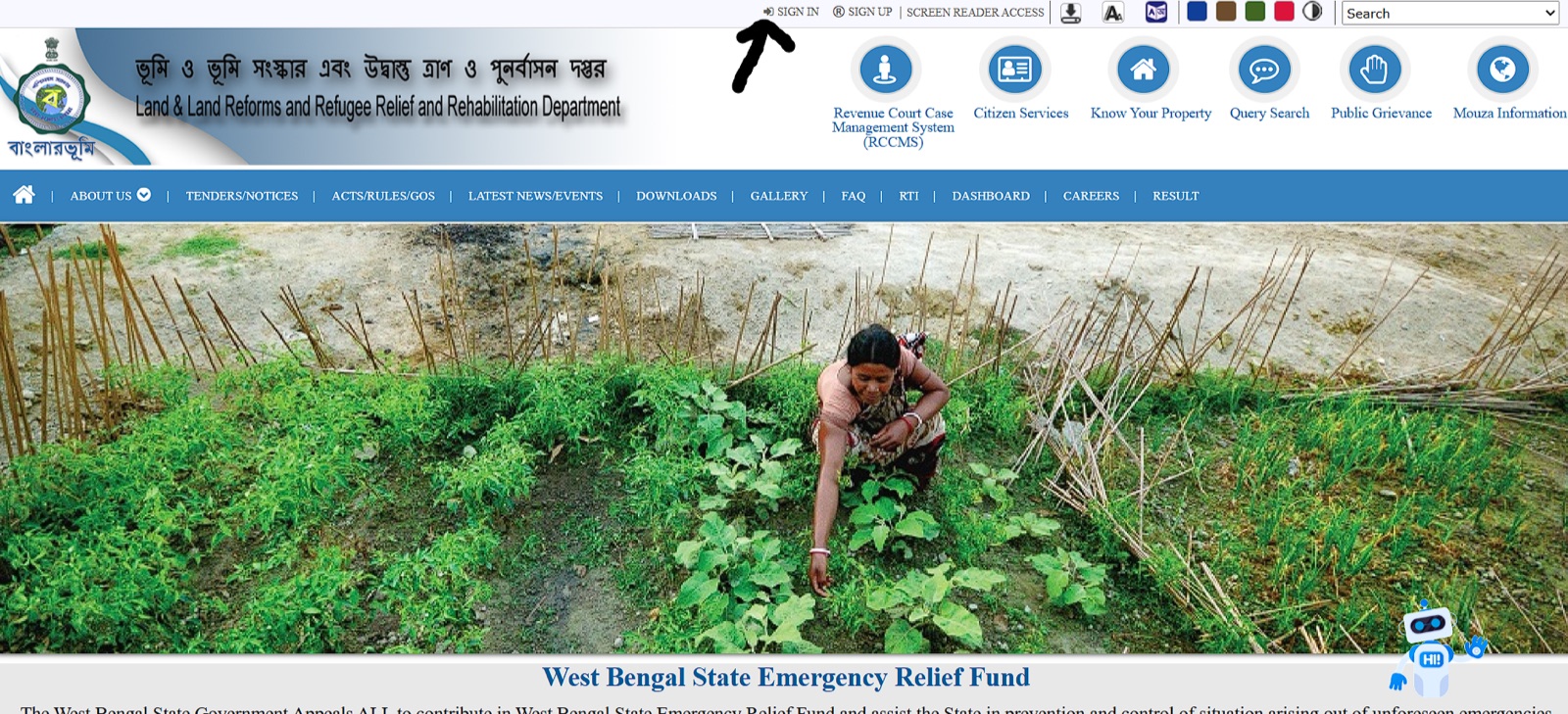
- Select user type:
- Citizen
- Departmental User (only for officials)
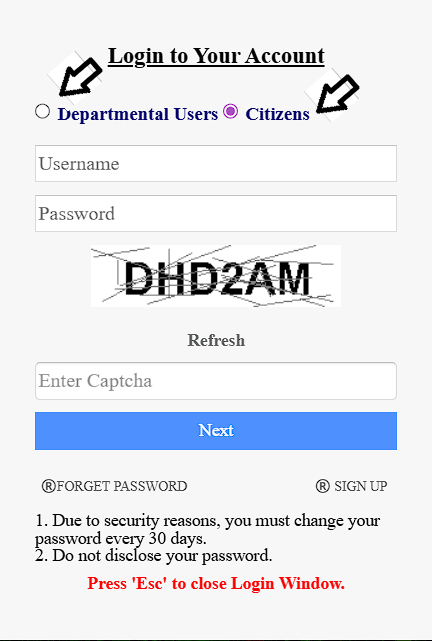
- Enter:
- Citizen login: mobile or username and password
- Captcha
- Click login and open your dashboard
Khatian and plot information: how to search the right way
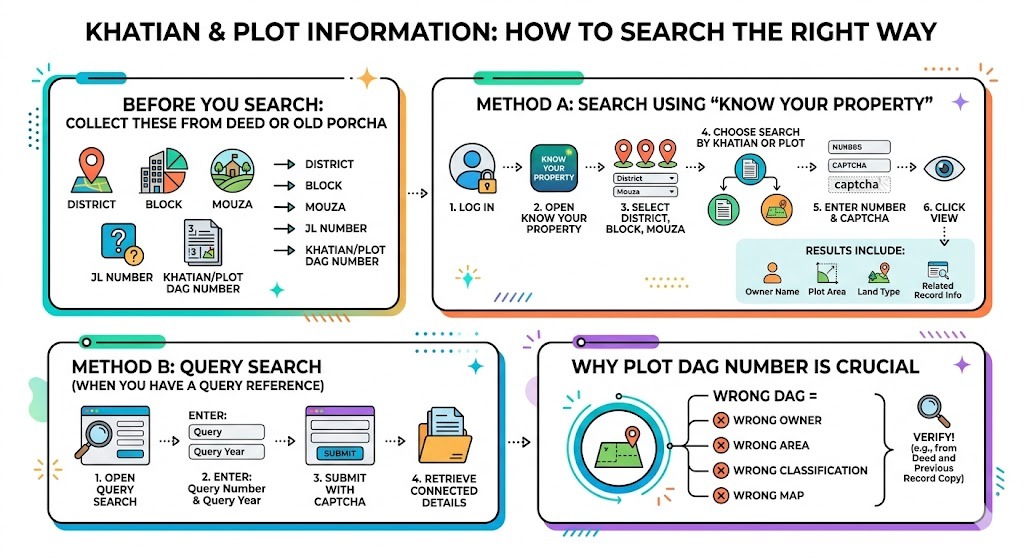
Before you search, collect these from deed papers or old porcha:
- District
- Block
- Mouza
- JL number (if needed)
- Khatian number or plot dag number
Method A: Search using Know Your Property
- Log in
- Open Know Your Property
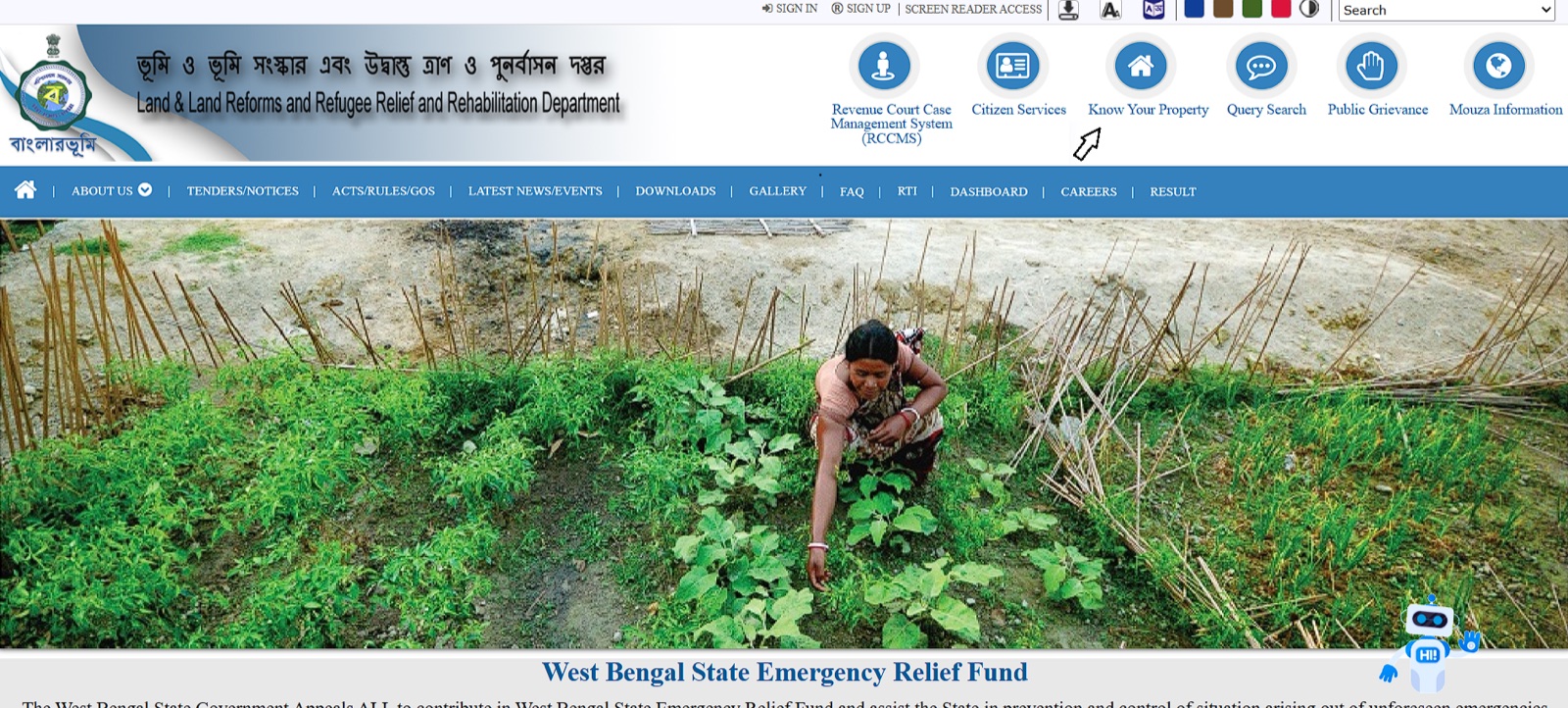
- Select District, Block, Mouza
- Choose:
- Search by Khatian, or
- Search by Plot
- Enter the number and the captcha.
- Click view
You typically see the owner's name, plot area, land type, and related record info.
Method B: Query search (when you have a query reference)
- Open Query Search
- Enter:
- Query number
- Query year
- Captcha
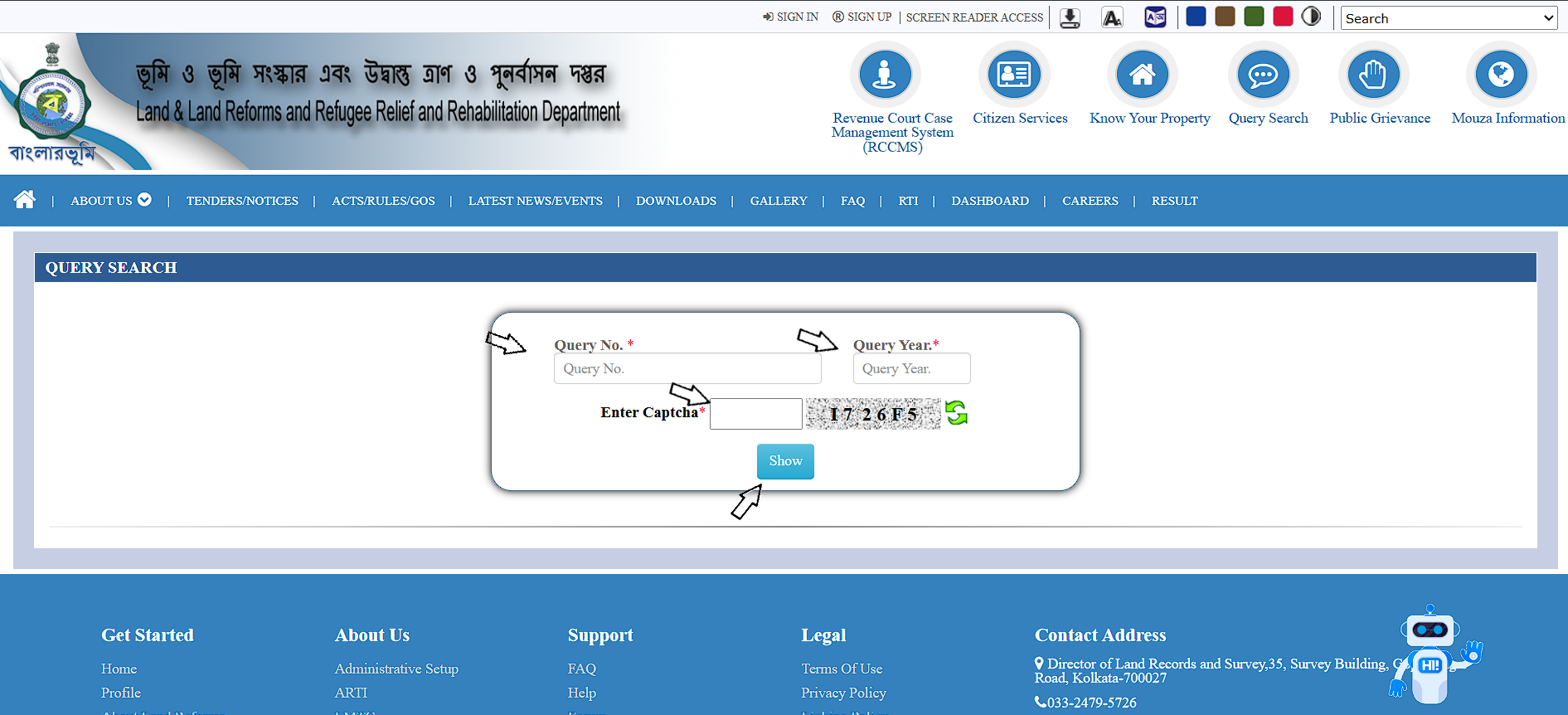
- Submit to retrieve connected details.
Why is the plot number crucial
A plot dag number is a unique identifier in land records. If you enter the wrong dag, everything else becomes wrong: owner, area, classification, and map. When I help buyers, I always verify the dag number against at least two independent sources, such as the registered deed and a previous record copy.
How to check RS and LR plot information on BanglarBhumi (Hal Dag vs Sabek Dag)
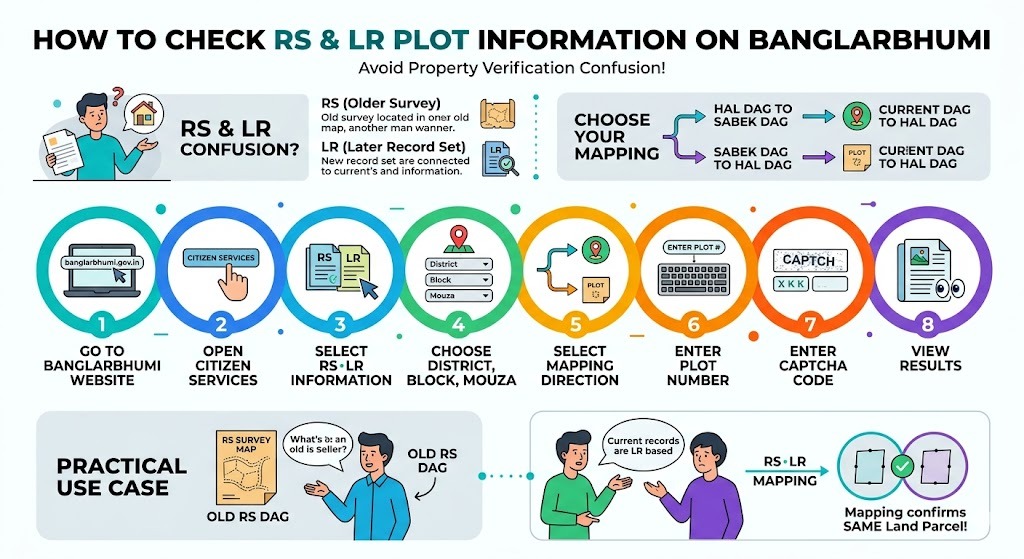
RS and LR confusion is one of the biggest reasons people get stuck in property verification.
- RS often refers to older survey references.
- LR is typically the later record set
You may need to map:
- Hal Dag to Sabek Dag, or
- Sabek Dag to Hal Dag
Steps
- Go to BanglarBhumi
- Open Citizen Services
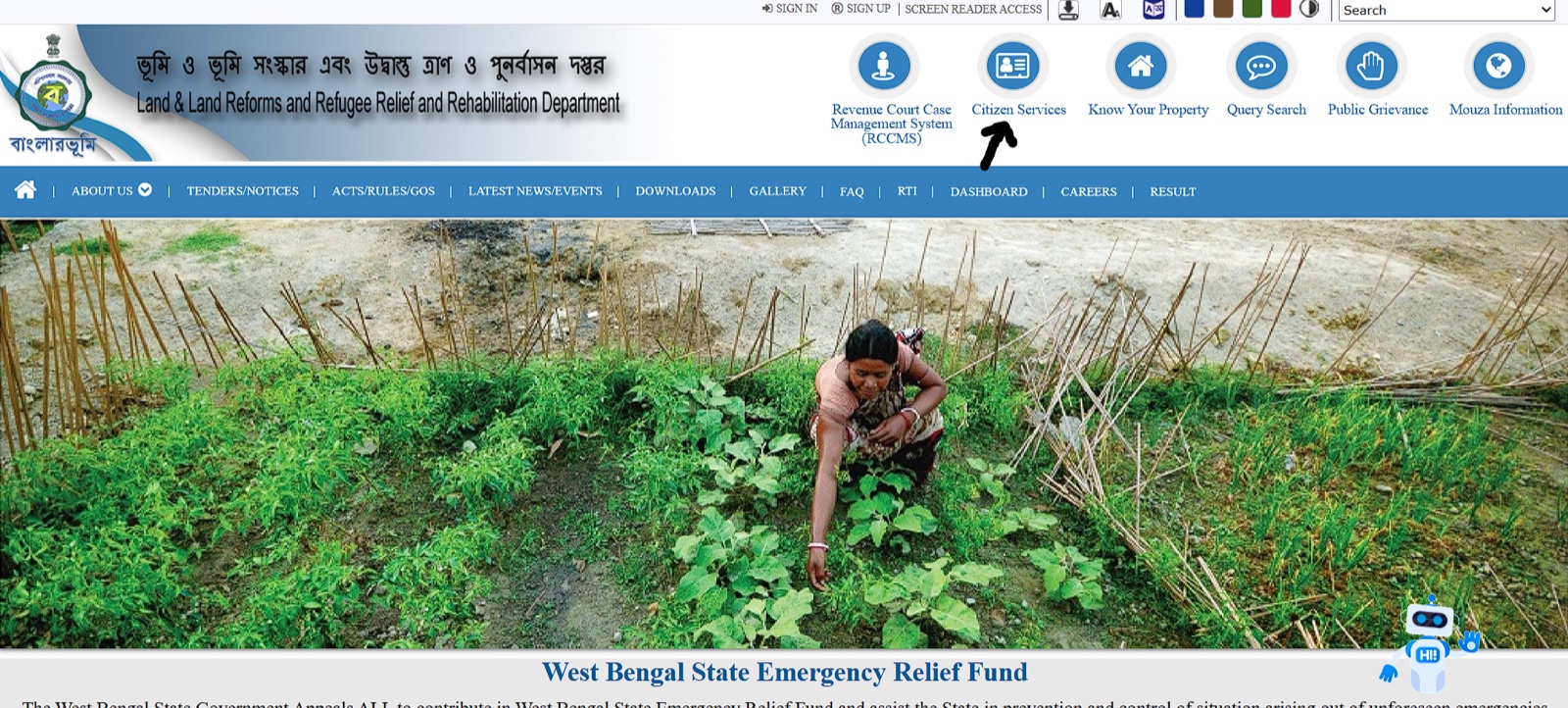
- Select RS LR Information
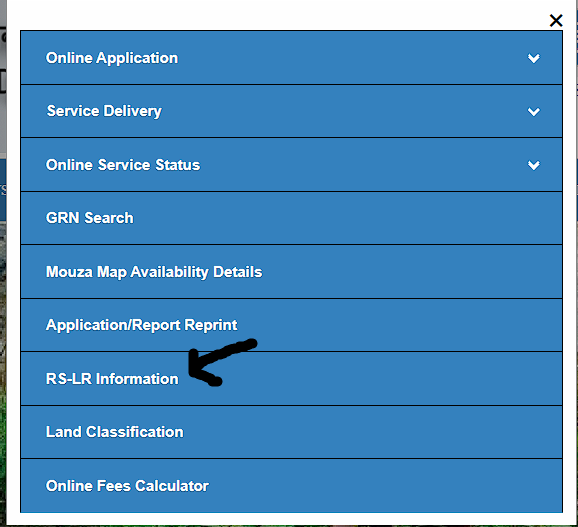
- Choose District, Block, Mouza
- Select mapping direction:
- Hal Dag to Sabek Dag, or
- Sabek Dag to Hal Dag
- Enter plot number
- Enter captcha
- View results
Practical use
If a seller shows you an old RS dag, but the current records are LR based, RS LR mapping helps confirm you are talking about the same land parcel.
How to obtain RoR certificate or e Porcha in West Bengal (BanglarBhumi)
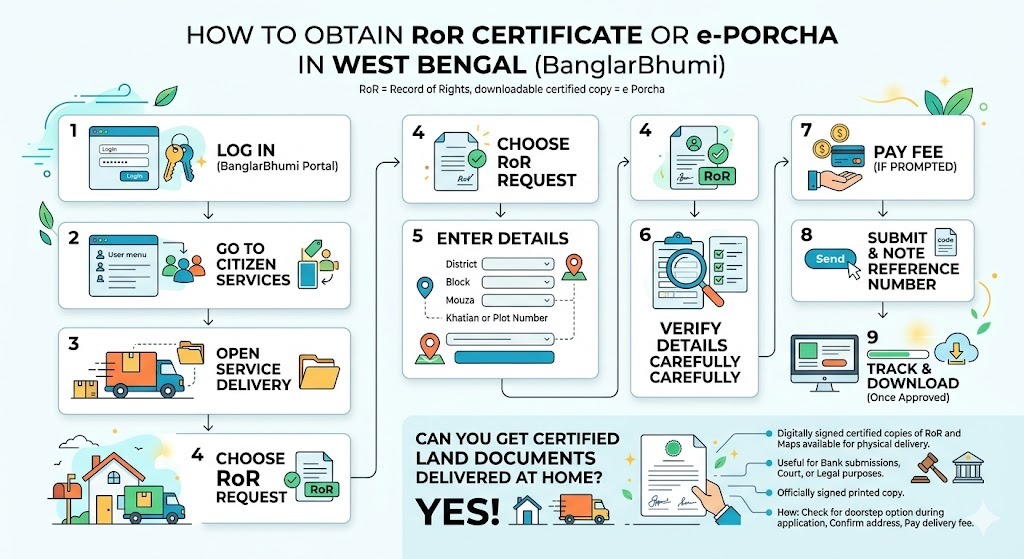
RoR is the Record of Rights. Many people also call the downloadable certified copy e Porcha.
What is e Porcha and why is it useful
e Porcha is the digitally signed, certified copy of the land Record of Rights (RoR) that you can download as a PDF from BanglarBhumi. It contains the official ownership details, plot area, land classification, and khatian information as recorded by the government. It is legally valid for property transactions, bank loan applications, court submissions, and mutation proceedings. Before e Porcha existed, people had to visit the BL&LRO office and wait for a physical certified copy, which could take days or weeks.
RoR request steps
- Log in
- Go to Citizen Services
- Open Service Delivery
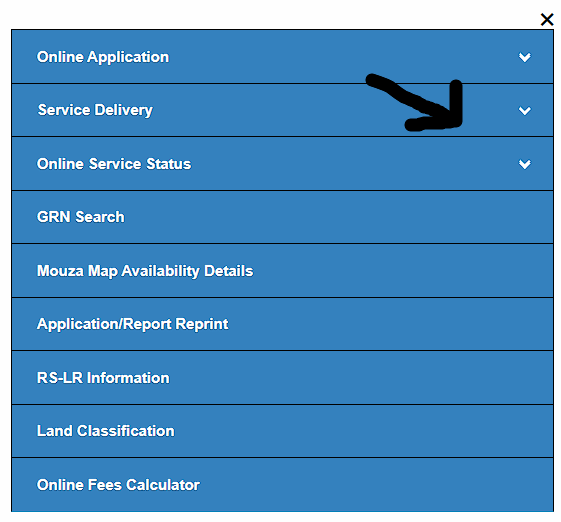
- Choose RoR Request
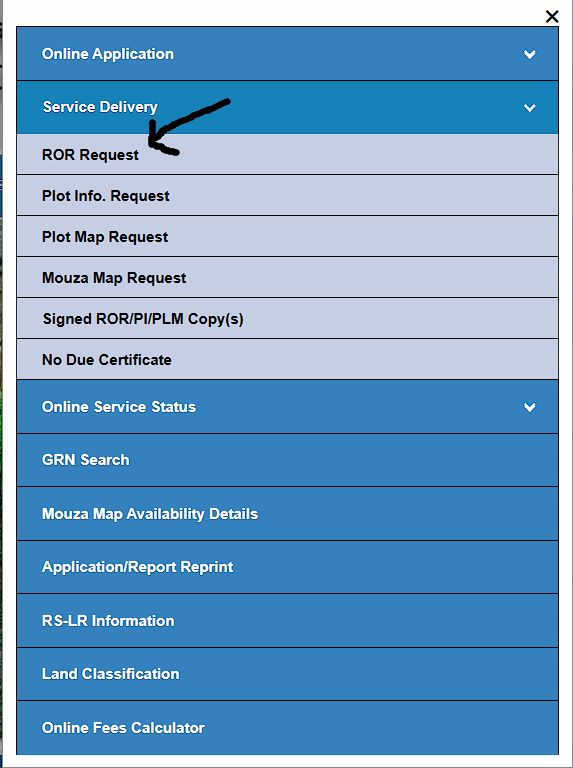
- Enter:
- District
- Block
- Mouza
- Khatian or plot number
- Verify details carefully
- Pay fee if prompted
- Submit and note the reference number
- Track and download once approved
Can you get certified land documents delivered at home?
Yes. BanglarBhumi offers an option where digitally signed certified copies of RoR and maps can be requested for physical delivery to your address. This is useful when you need a printed certified copy with official signatures for bank submissions, court requirements, or legal documentation purposes.
When applying for RoR or map services under Service Delivery, check whether the doorstep delivery option is available for your requested document. If available, you will be asked to confirm your mailing address and pay the applicable delivery fee along with the document fee.
How to download certified land record copy (e Porcha) and why GRN matters
What is GRN search
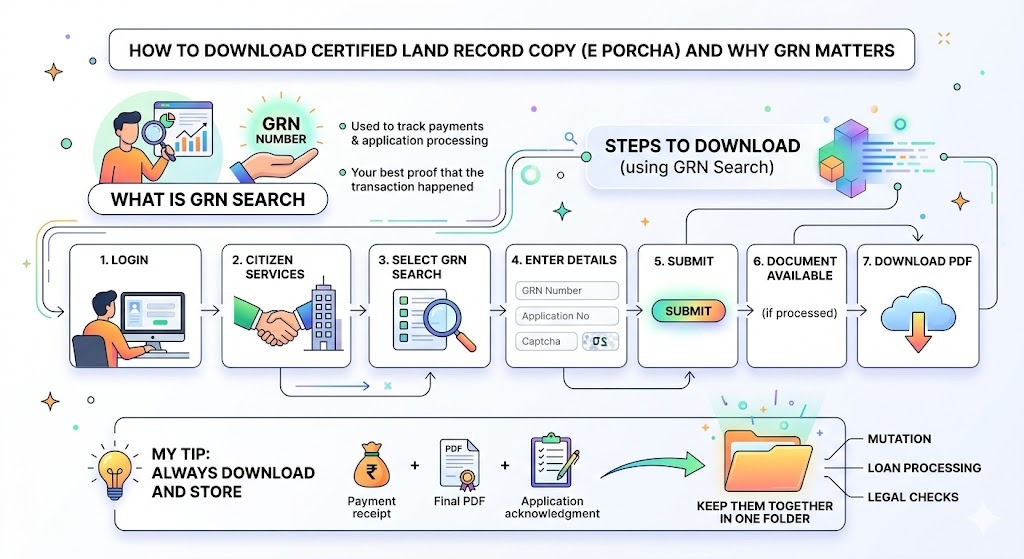
GRN is used to track payments and application processing. After you pay for a service, GRN is your best proof that the transaction happened.
Steps to download using GRN or application search
- Log in
- Go to Citizen Services
- Select GRN Search or Application GRN Search
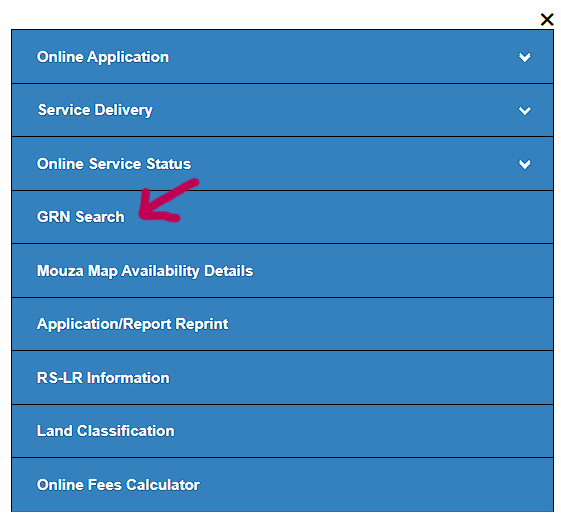
- Enter:
- GRN number (and/or application number depending on option)
- Captcha
- Submit
- If processed, the certified document becomes available
- Download PDF and save it safely
How to pay Khajna, mutation, or conversion fees online
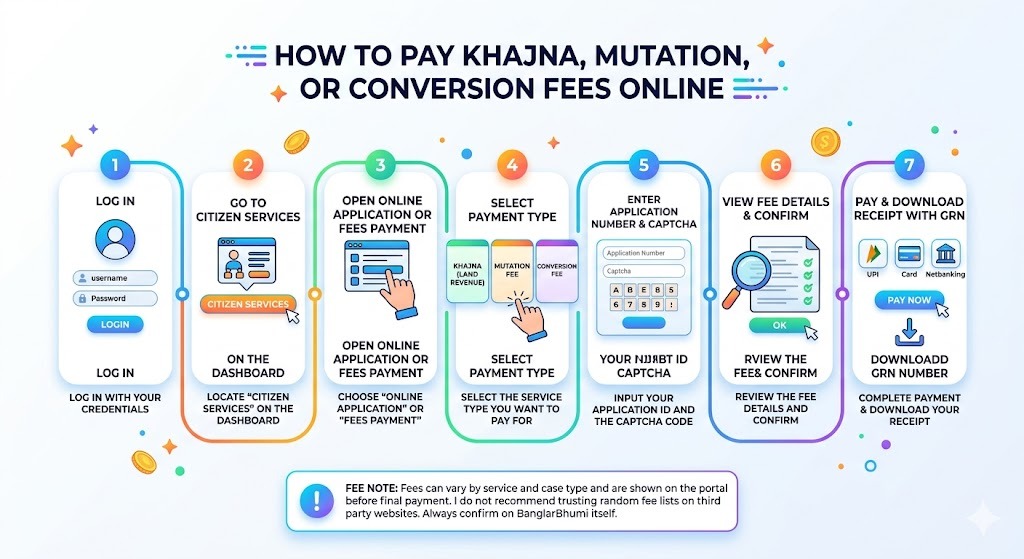
- Log in
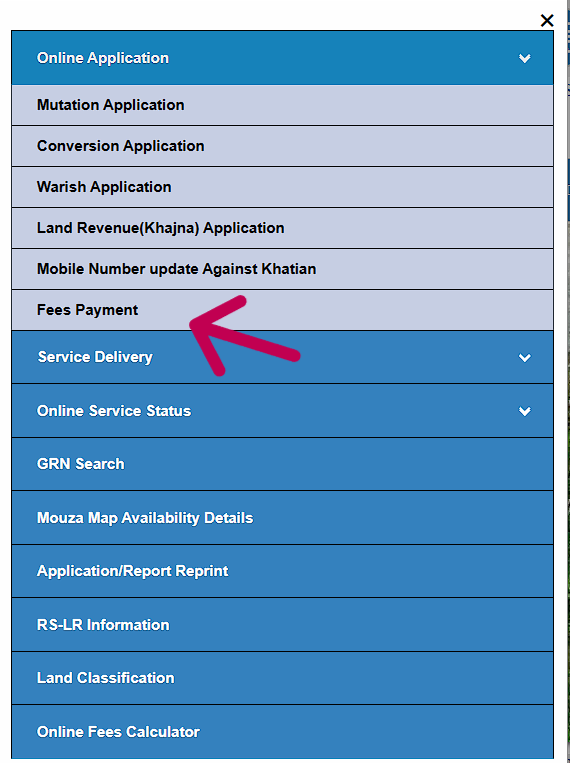
- Go to Citizen Services
- Open Online Application or Fees Payment
- Select payment type:
- Khajna (land revenue)
- Mutation fee
- Conversion fee
- Enter application number and captcha
- View fee details and confirm
- Choose payment method (the portal typically uses the GRIPS payment gateway; options may include net banking or other available methods)
- Complete payment and download receipt with GRN
How to apply for mutation on BanglarBhumi (2026)
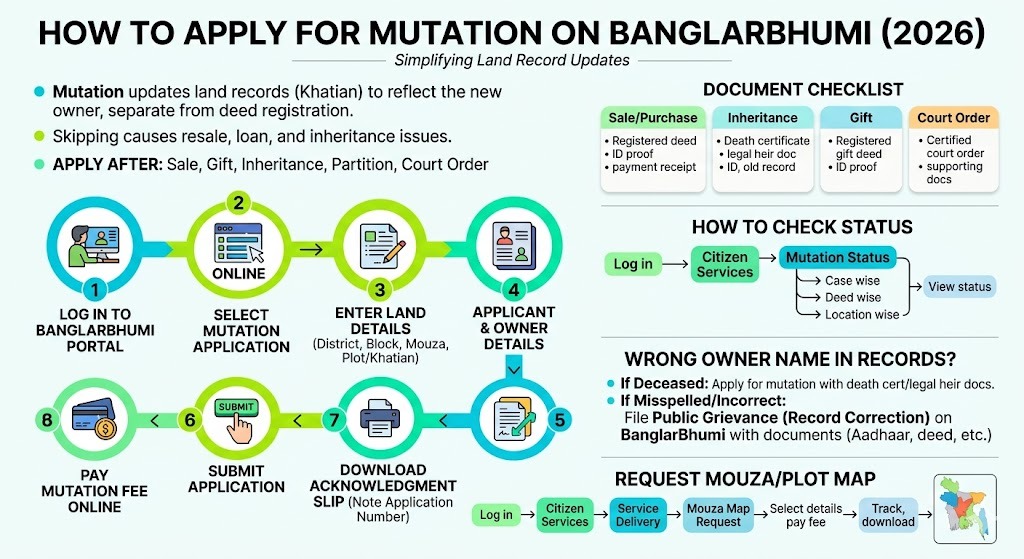
Getting your sale deed registered at the Sub-Registrar office does not automatically update the land record in your name. These are two completely separate processes handled by two different departments.
The deed registration records the transaction. Mutation updates the government land record to reflect the new owner. If you skip mutation after buying land, the Khatian will still show the previous owner's name. This creates serious problems during resale, loan applications, and inheritance later.
Mutation updates land record ownership after:
- Sale
- Gift
- Inheritance
- Partition
- Court order
Steps to apply online
- Log in
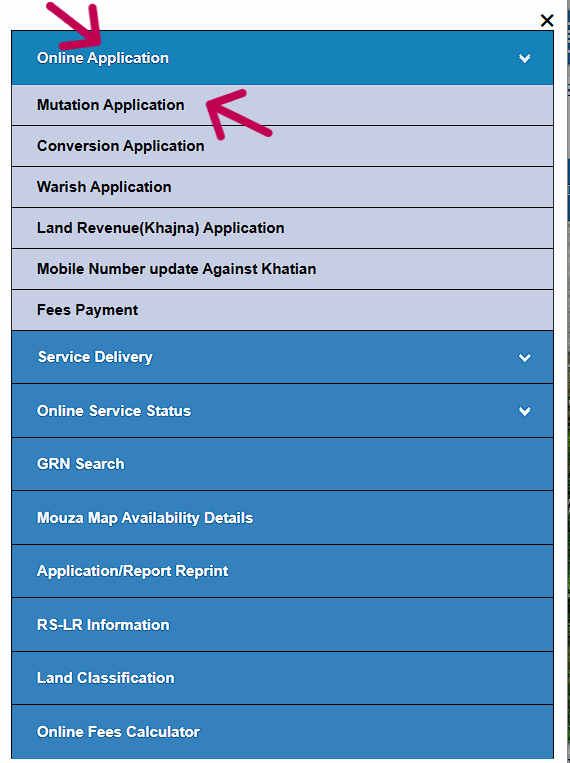
- Go to Online Application
- Select Mutation Application
- Enter land details:
- District, block, mouza
- Khatian or plot
- Buyer seller or applicant details
- Upload documents
- Pay mutation fee online
- Submit
- Download acknowledgment slip and note application number
Document checklist for mutation
| Reason | Required Documents |
|---|---|
| Sale/purchase | Registered deed, ID proof, payment receipt if required, applicant details |
| Inheritance | Death certificate, legal heir document as applicable, ID proof, existing record copy |
| Gift | Registered gift deed, ID proof |
| Court order | Certified court order, supporting documents |
Exact requirements may differ by office and case. Upload format and size limits are typically shown on the portal during upload.
How to check mutation status
- Log in
- Go to Citizen Services
- Open Mutation Status
- Choose search type:
- Case wise
- Deed wise
- Location wise
- Enter details and search to view status
What to do if the owner name in BanglarBhumi records is wrong
This is one of the most common problems people face, especially with inherited property or old family land. The Khatian may still show a deceased person's name, a misspelled name, or the name of a previous owner who sold years ago.
Here is what you should do depending on the situation:
- If the owner is deceased and property passed through inheritance, apply for mutation with death certificate and legal heir documents. Once mutation is approved, the record will reflect the correct current owner.
- If the name is misspelled or incorrectly entered, file a Public Grievance through BanglarBhumi under petition type record correction. Attach supporting documents like Aadhaar, previous porcha, or deed copy to support your claim.
How to request and view a mouza map or plot map on BanglarBhumi
If you are buying land, maps matter as much as record text. Maps help you confirm boundaries, access roads, and whether the plot is where you think it is. A mouza map shows the full layout of plots within a mouza, while a plot map focuses on a specific parcel.
Steps to request mouza map
- Log in
- Go to Citizen Services
- Select Service Delivery
- Choose Mouza Map Request
- Select:
- District, block, mouza
- Map type (LR or RS if available)
- Sheet number or plot number if asked
- Complete the form and pay the applicable fee if prompted via the payment gateway
- Track status and download map after processing
Once approved and processed, you can view and download the map. The map displays the precise land plot layout, boundaries, and neighbouring plots within the mouza, which is especially useful for confirming that the physical land matches the official record before completing a purchase.
Land classification and conversion process (agricultural to non agricultural)
How to verify land classification
- Open citizen services
- Enter district block mouza
- Search by khatian or plot
- Check land class or land code shown in results
Land classification affects:
- Whether construction is allowed
- Land value and stamp duty planning
- Loan and approval processes
Conversion application: documents and steps
Common documents:
| Document | Purpose |
|---|---|
| Application form | Starts the conversion request |
| Ownership proof | Deed, RoR, mutation proof where applicable |
| Tax payment receipt | Shows dues are clear |
| Land map | Helps identify and confirm the exact parcel |
| NOC if asked | Sometimes required depending on case and location |
Steps:
- Log in
- Go to Online Application
- Choose Conversion Application
- Enter district mouza khatian plot details
- Upload documents
- Pay fee online
- Submit and track using application number or GRN
How to reprint application or receipt on BanglarBhumi
If you lost the receipt or need another copy for bank or office:
- Log in
- Go to Online Application
- Select Reprint Application Receipt (wording may vary)
- Choose application type: mutation, conversion, RoR, map, etc.
- Enter application number and captcha
- Download or print
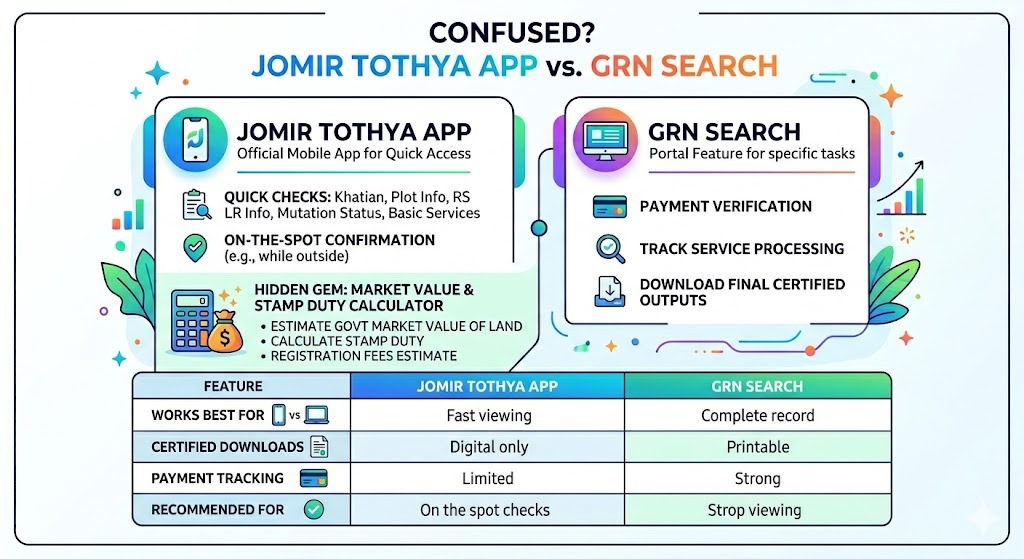
Jomir Tothya app vs GRN search (people confuse these)
Jomir Tothya app
- Official mobile app by NIC for quick access to West Bengal land records
- Previously distributed for Android via Google Play; the listing has been unavailable at times — check banglarbhumi.gov.in for current availability
- Supports Bangla and English interfaces
- Useful for fast checks: khatian plot info, RS LR info, mutation status, basic services
- Best when you are outside and need quick confirmation
One feature of the Jomir Tothya app that most people miss is the built-in market value and stamp duty calculator. If you are planning to buy land or register a property, you can use this feature to get an estimate of:
- Current government market value of the land
- Applicable stamp duty based on the transaction value
- Registration fees estimate
GRN search
A portal feature focused on:
- Payment verification
- Tracking service processing
- Downloading final certified outputs
Quick comparison table:
| Feature | Jomir Tothya App | GRN Search (Portal) |
|---|---|---|
| Works best for | Fast viewing on phone | Tracking payments and downloading final documents |
| Certified downloads | Limited compared to portal | Yes where available |
| Payment tracking | Limited | Strong |
| Recommended for | On the spot checks | Any paid service follow up |
Public grievance on BanglarBhumi: file and track complaints
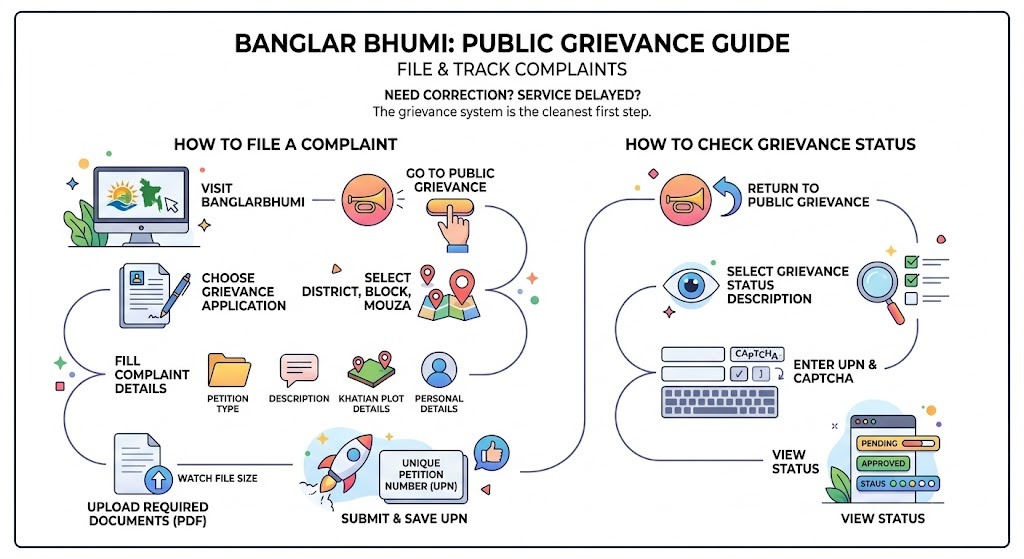
If a record needs correction or your service is delayed, the grievance system is the cleanest first step.
How to file a complaint
- Visit BanglarBhumi
- Go to Public Grievance
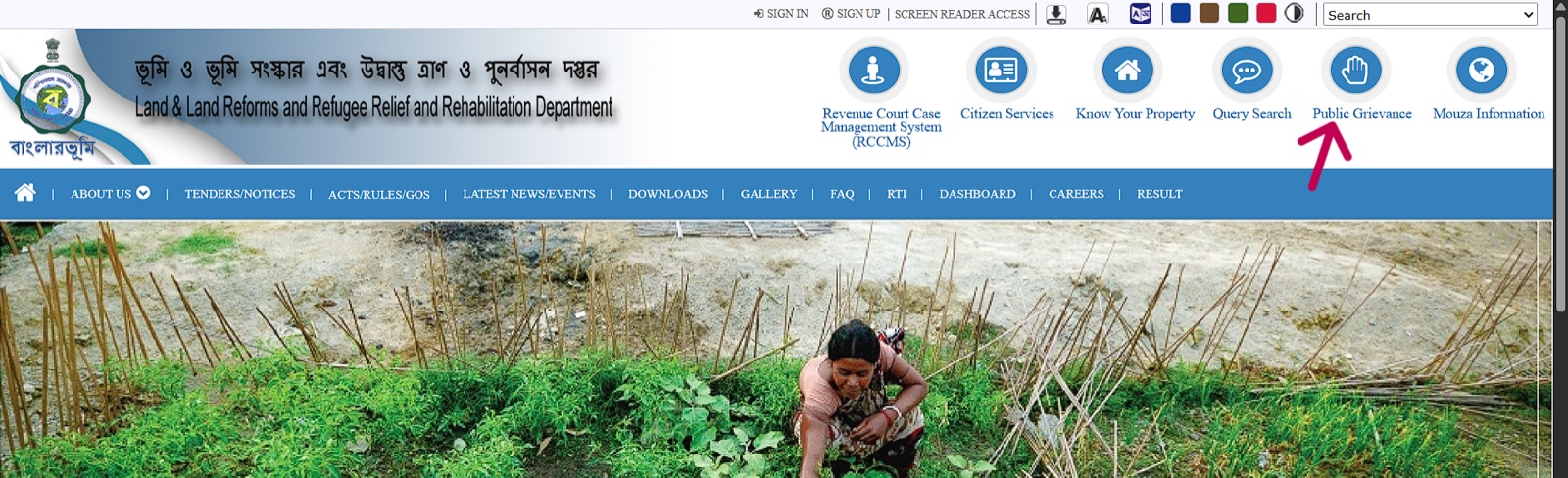
- Choose Grievance Application
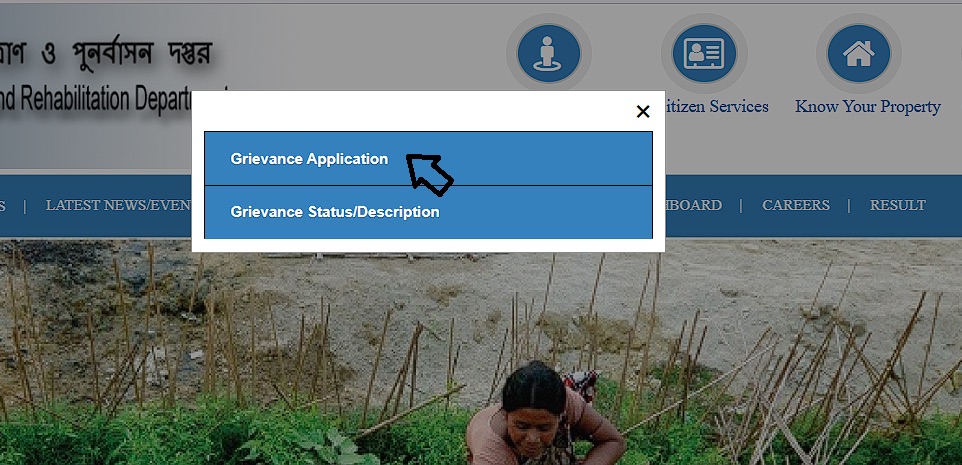
- Select district block mouza
- Fill complaint details:
- Petition type
- Description
- Khatian plot details
- Personal details
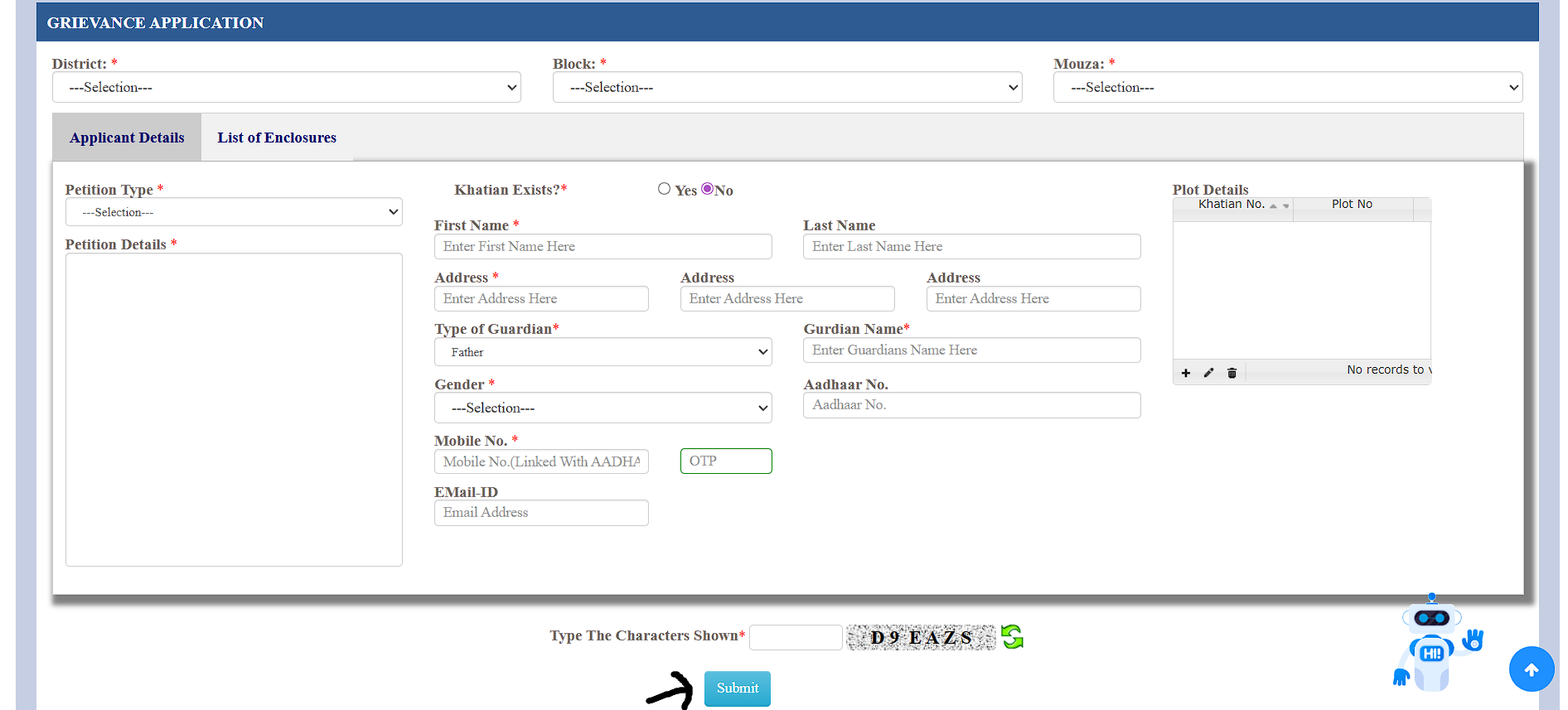
- Upload required documents in PDF format (max file size is typically 2 MB per document)
- Submit and save the UPN (Unique Petition Number)
How to check grievance status
- Go to Public Grievance
- Select Grievance Status Description
- Enter UPN and captcha
- View status
Benefits, safety tips, and common mistakes (from what I see most)
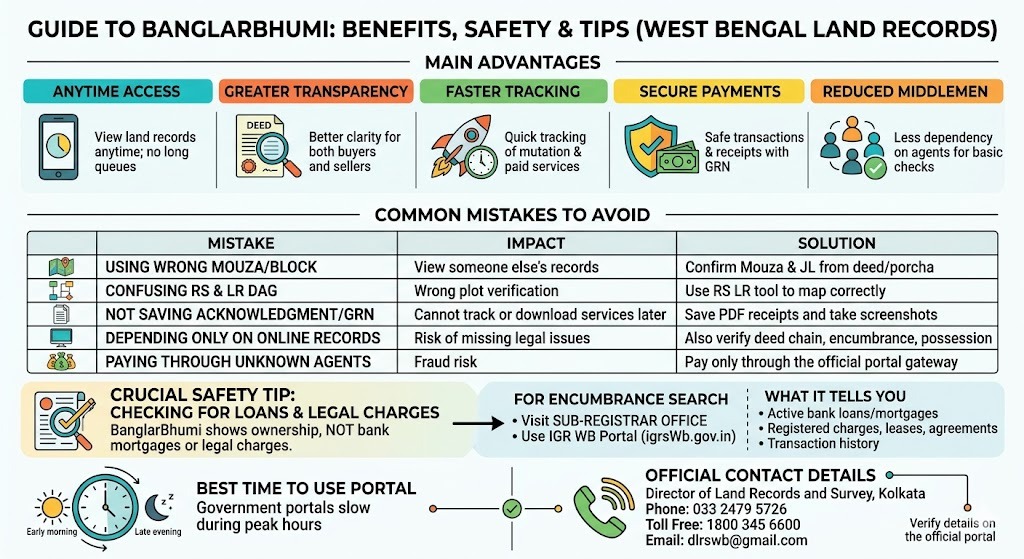
Main advantages
- Access land records anytime without standing in long queues
- Better transparency for buyers and sellers
- Faster tracking of mutation and paid services
- Secure payments and receipts with GRN
- Reduced dependency on middlemen for basic checks
- Real-time status tracking for mutation, conversion, RoR, and grievance applications using application number, UPN, or GRN
- Available in multiple languages (English, Bangla, Hindi) so it is accessible to a wider range of citizens
- Digitally signed documents reduce risk of tampering compared to paper copies
Common mistakes to avoid
| Mistake | What happens | How to avoid |
|---|---|---|
| Using wrong mouza or block | You see someone else's land record | Confirm mouza and JL from deed or old porcha |
| Confusing RS dag with LR dag | Wrong plot verification | Use RS LR info tool to map correctly |
| Not saving acknowledgment or GRN | Cannot track or download later | Save PDF receipts and take screenshots |
| Depending only on online record for purchase | Risk of missing legal issues | Also verify deed chain, encumbrance, possession, and do legal review |
| Paying through unknown agents | Fraud risk | Pay only through official portal gateway |
How to check if land has a loan or legal charge against it
BanglarBhumi shows ownership and plot details, but it does not show whether a bank has a mortgage on the land or whether there is a legal charge registered against it. This is a critical gap that many buyers overlook.
To check encumbrance on a property in West Bengal, you need to visit the office of the Sub-Registrar where the property is registered and request an encumbrance certificate for the relevant period. Some districts also allow encumbrance search through the IGR West Bengal portal.
What encumbrance check tells you:
- Whether any bank loan or mortgage is active against the land
- Whether any legal charge, lease, or agreement is registered
- Transaction history for the period you request
Best time to use portal
In my experience, government portals slow down during peak hours. If pages time out, try early morning or later evening.
BanglarBhumi contact details (official support)
| Office address | Director of Land Records and Survey, 35 Survey Building, Gopal Nagar Road, Kolkata 700027 |
| Phone | 033 2479 5726 |
| Toll free | 1800 345 6600 |
| dlrswb@gmail.com |
Contact details can change over time. If any number does not connect, verify once on the official portal.
FAQs (BanglarBhumi 2026)
How can you view West Bengal land records online? ▼
Is BanglarBhumi free to use? ▼
What are Khatian number and Dag or Plot number? ▼
Can you apply for land mutation online on BanglarBhumi? ▼
Can you check mouza maps online? ▼
How do you download e Porcha from BanglarBhumi? ▼
What is GRN and why is it important? ▼
How can you verify land ownership through BanglarBhumi? ▼
What is e Porcha and how is it useful? ▼
How can you track the status of your application on BanglarBhumi? ▼
Can you apply for land conversion on BanglarBhumi? ▼
Can you check land records and Khatian details online in West Bengal? ▼
How do you contact BanglarBhumi for assistance? ▼
Final note
BanglarBhumi has genuinely improved how land verification works in West Bengal. If you use it correctly, you can verify khatian plot details, match RS and LR dags, request RoR e Porcha, pay khajna, apply mutation, and track everything with proper reference numbers. The key is accuracy: correct mouza, correct plot, and saving every acknowledgment and GRN.