Banglarbhumi App (West Bengal) Launched: Check Land Records, Khatian and Plot Details on Mobile
If you’ve ever stood in a long line at a land office just to confirm a Khatian number or verify a Plot (Dag), you already know why a mobile solution matters. I’ve personally helped families, land buyers, and even a few local brokers verify land details through Banglarbhumi before paying an advance, and the biggest pain point is always the same: getting official, updated records quickly.
The Banglarbhumi mobile app (linked to the Land and Land Reforms Department, Government of West Bengal) is designed to simplify that process by allowing you to view land record details on your phone.
In this guide, I’ll walk you through everything you need to know, including what you can do inside the app, what details you should keep ready, how to search correctly (so you don’t get wrong results), how to save records for offline use, and common problems with fixes.
Quick Download (Official App Safety Tips First)
Before you download anything, I strongly recommend you verify the app listing:
- Check the developer name and make sure it’s related to the Government of West Bengal or the official department.
- Read recent reviews and update notes.
- Avoid “Banglarbhumi” apps that ask for unnecessary permissions (contacts, full storage access, etc.).
Banglarbhumi App Overview
The Banglarbhumi app is designed to provide mobile access to West Bengal land record information, such as:
- Khatian / Record of Rights (RoR)
- Plot (Dag) information
- Ownership-related details shown in the official database
- Land type/classification details (where available)
This matters because West Bengal land records are organized in a structured way (District → Block → Mouza → JL No. → Khatian/Plot). Once you enter the correct administrative details, you can view the corresponding record.
Advantages of the Banglarbhumi App (Why It’s a Big Deal)
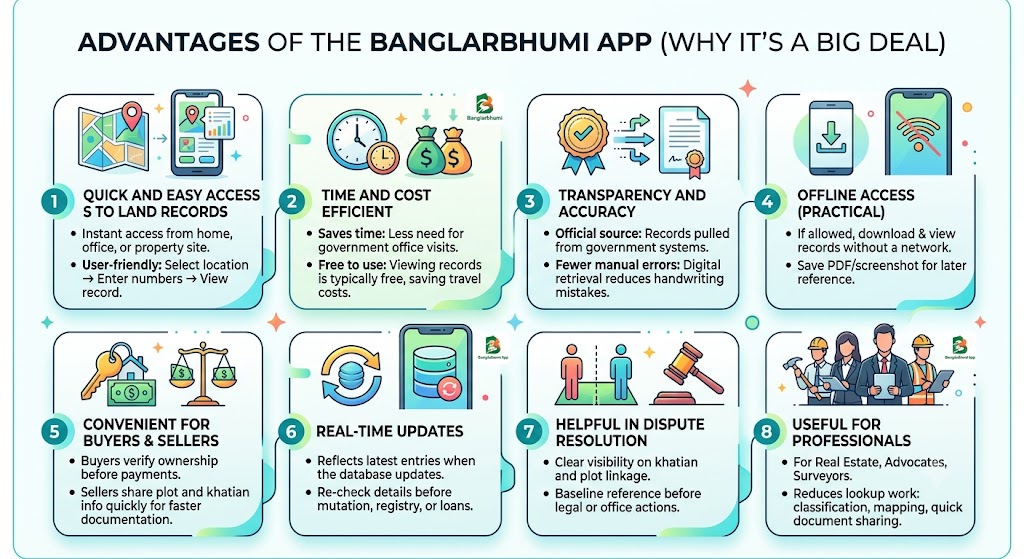
Quick and easy access to land records
- Instant access: You can check land records from home, your office, or even while visiting a property site.
- User-friendly layout: Even if you’re not tech-savvy, the flow is usually simple: select location → enter numbers → view record.
Time and cost efficient
- Saves time: No need for repeated visits to offices for basic verification.
- Free to use: Typically, viewing records is free. You also save travel costs and avoid middlemen for simple checks.
Transparency and accuracy
- Official source: Records are pulled from the government system connected to land reforms/land records.
- Fewer manual errors: Digital retrieval reduces mistakes that happen due to handwritten entries or misread copies.
Offline access (practical in low-network areas)
- If the app allows downloads, you can save a record and view it later when the network is weak.
- If download isn’t available in your version, you can still keep a PDF/screenshot for reference.
Convenient for buyers and sellers
- Buyers can verify ownership details before paying token money.
- Sellers can quickly share plot and khatian info for faster negotiation and documentation.
Real-time updates (as per database availability)
- When the database is updated, the app reflects the latest available entries.
- You can re-check details before mutation, registry, or loan processing.
Helpful in dispute resolution
- Clear visibility of khatian and plot linkage helps reduce confusion between neighbors.
- It gives you a baseline reference before you approach a lawyer or land office.
Useful for professionals
For real estate professionals, advocates, surveyors, and documentation agents, the app reduces basic lookup work, especially for:
- Land classification checks
- Plot mapping references (if enabled in your region)
- Quick document sharing with clients
Key Land Record Terms (Simple Meanings)
Here’s the exact mini-glossary I explain to clients before we search anything:
| Term | Meaning | Why It Matters |
|---|---|---|
Khatian | Record that contains ownership and land details | Most searches start with Khatian |
Plot / Dag | Specific land parcel number under a Khatian | Needed to identify exact land piece |
Mouza | Revenue village/area used for land records | Wrong mouza = wrong record |
JL No. | Jurisdiction List number linked with mouza | Often required for accurate search |
RoR | Record of Rights | The “official record view” people need |
RS / LR | Older and updated settlement records (varies by area) | Helps reconcile old vs new records |
Mutation | Updating owner name after transfer/inheritance | Required after registry in many cases |
What You Need Before Using the Banglarbhumi App
Keep these ready (this avoids 90 percent of search errors I see):
Minimum details checklist
| Search Method | Recommended | Notes |
|---|---|---|
District + Block + Mouza + Khatian No. | Yes | Most direct method |
District + Block + Mouza + Plot (Dag) No. | Yes | Useful if khatian not known |
Just owner name | Sometimes limited | Depends on availability and area |
Old deed details only | Not always | You may need RS/LR mapping help |
West Bengal administrative structure reminder
West Bengal currently has 23 districts, and land records are usually arranged by District → Block → Mouza → JL No. Make sure you pick the correct combination.
How to Register on the Banglarbhumi App (Step-by-Step)
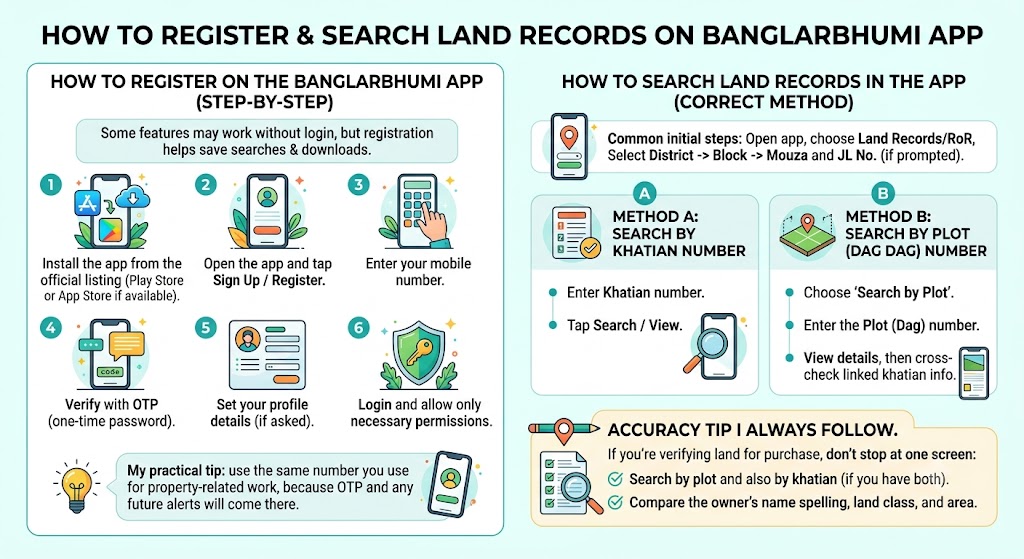
Some features may work without login, but if registration is available, it’s helpful for saving searches and downloads.
- Install the app from the official listing (Play Store or App Store if available).
- Open the app and tap Sign Up / Register.
- Enter your mobile number.
- Verify with OTP (one-time password).
- Set your profile details (if asked).
- Login and allow only necessary permissions.
My practical tip: use the same number you use for property-related work, because OTP and any future alerts will come there.
How to Search Land Records in the App (Correct Method)
Method A: Search by Khatian number
- Open the app → choose Land Records / RoR.
- Select District.
- Select Block.
- Select Mouza and JL No. (if prompted).
- Enter Khatian number.
- Tap Search / View.
Method B: Search by Plot (Dag) number
- Same steps as above (District → Block → Mouza).
- Choose Search by Plot.
- Enter the Plot (Dag) number.
- View details, then cross-check linked khatian info.
Accuracy tip I always follow.
If you’re verifying land for purchase, don’t stop at one screen:
- Search by plot and also by khatian (if you have both).
- Compare the owner's name spelling, land class, and area.
Download, Save, and Use Records Offline
Offline usefulness depends on the app version and available download options. Here are the safe ways people commonly store records:
Options to save records
| Option | Available | Best For |
|---|---|---|
Download PDF inside app (if available) | Yes | Clean sharing and printing |
Save to phone storage | Yes | Long-term record keeping |
Screenshot (last resort) | Yes | Quick proof while on site visit |
Email/Share from app | Yes (after sending) | Sending to lawyer/buyer |
How to save for offline viewing (general steps)
- Open the record page.
- Tap Download / Save / Export (name may vary).
- Save as PDF if possible.
- Store in a folder named like: Land Records > District > Mouza > Date.
Tip from real field use: when you’re visiting a property site, the network can be unstable. I download the record before leaving home so I can open it anytime.
How the App Helps in Buying, Selling, and Disputes
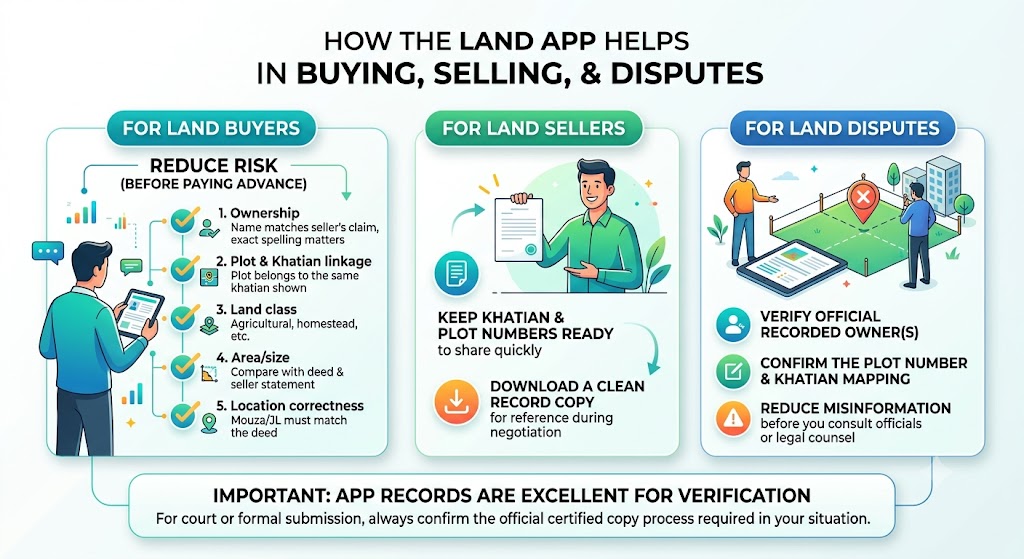
For land buyers (do this before paying the advance)
Use this checklist to reduce risk:
| Check | What To Verify |
|---|---|
Ownership | Name matches seller’s claim (exact spelling matters) |
Plot and Khatian linkage | Plot belongs to the same khatian shown |
Land class | Agricultural, homestead, etc. (important for use permissions) |
Area/size | Compare with deed and seller statement |
Location correctness | Mouza/JL must match the deed |
For land sellers
- Keep the khatian and plot numbers ready to share quickly.
- Download a clean record copy for reference during negotiation.
For disputes
In boundary or ownership disputes, the app record helps you:
- Verify the official recorded owner(s)
- Confirm the plot number and khatian mapping.
- Reduce misinformation before you consult officials or legal counsel.
Important: app records are excellent for verification, but for court or formal submission, always confirm the official certified copy process required in your situation.
Advanced Features You Should Explore (If Available)
Depending on the area and version, you may find features like:
- Interactive maps to visualize plot location context
- Land classification (useful for conversion and development planning)
- Record type view (RS/LR where available) to compare older and updated entries
- Document download for easier sharing and record-keeping
Security and Privacy Features (Plus What You Should Do)
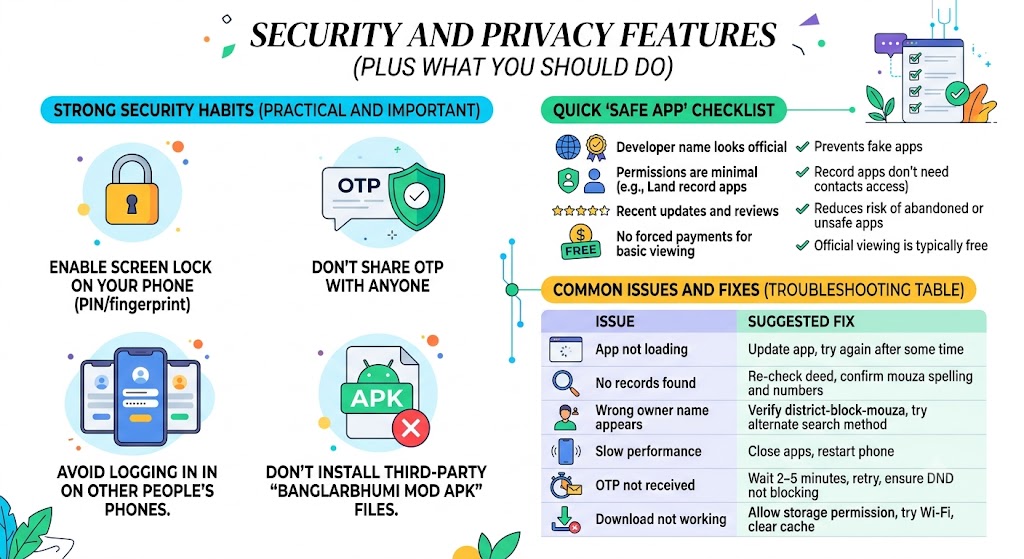
Some app versions mention secure login and protections. Regardless, you should follow these best practices:
Strong security habits (practical and important)
- Enable screen lock on your phone (PIN/fingerprint).
- Don’t share OTP with anyone.
- Avoid logging in on other people’s phones.
- Don’t install third-party “Banglarbhumi mod APK” files.
Quick “safe app” checklist
| Check | Why It Matters |
|---|---|
Developer name looks official | Prevents fake apps |
Permissions are minimal | Land record apps don’t need contacts access |
Recent updates and reviews | Reduces risk of abandoned or unsafe apps |
No forced payments for basic viewing | Official viewing is typically free |
Common Issues and Fixes (Troubleshooting Table)
These are the exact issues I’ve seen most often while helping people search:
| Issue | Likely Cause | Fix |
|---|---|---|
App not loading | Old version or server load | Update app, try again after some time |
No records found | Wrong Mouza/JL/Khatian/Plot | Re-check deed, confirm mouza spelling and numbers |
Wrong owner name appears | You selected wrong record type/area | Verify district-block-mouza, try alternate search method |
Slow performance | Low RAM/background apps | Close apps, restart phone |
OTP not received | Network/SMS delay | Wait 2–5 minutes, retry, ensure DND not blocking |
Download not working | Storage permission or server issue | Allow storage permission, try Wi‑Fi, clear cache |
FAQs
What is the Banglarbhumi App?
It’s a mobile application intended to provide access to West Bengal land record information, including Khatian (RoR) and Plot (Dag) details from the official system.
Can I use the app without an internet connection?
For searching, you typically need internet access. However, if you download/save records, you can view those saved files offline later.
How can I check my land records using the app?
Select District → Block → Mouza (and JL No. if asked), then search using Khatian number or Plot (Dag) number.
Is the Banglarbhumi app available for iOS?
Availability can change over time. Check the Apple App Store for an official listing and verify the developer before installing.
How do I download land documents from the app?
Open the record view and look for Download / Save / Export. If your version doesn’t provide a download button, save a PDF via share options or keep a screenshot for temporary reference.
Can I get the Khatian number from the app?
If you already know the plot number and correct location details, the app may show linked record details. If you only have a name, results may be limited depending on the dataset.
What should I do if the app is not working?
Update the app, clear the cache, restart your phone, and try again during non-peak hours. Also verify your district-block-mouza selection.
Can I verify land ownership details?
You can check the recorded ownership details shown in the land record view. For legal confirmation, match it with deed papers and follow certified copy procedures when required.
Is the Banglarbhumi app free to use?
Viewing land record information is generally free. Be cautious of any app that forces payment for basic access.
How can I share land records with others?
Use the app’s share/export option if available, or share the downloaded PDF. For quick sharing, a clear screenshot can work, but PDF is better for documentation.
Final Thoughts
If you own land in West Bengal, or you’re planning to buy or sell, the Banglarbhumi app can save you hours by putting official land record lookups in your pocket. In my experience, the real value is not just convenience, but verification. When you verify plot and khatian details early, you avoid costly surprises later.
My last advice: use the app as your first step, then cross-check with deed details and certified processes when the situation demands it. That combination keeps you fast and safe.