How to Request a Mouza Map with Plot Number in West Bengal (Banglarbhumi) New Update 2026
If you’re trying to verify land boundaries, check a specific plot, or keep your paperwork ready for a sale, loan, mutation, or family settlement, a Mouza Map with Plot Number is one of the most useful documents you can download in West Bengal.
I’ve personally used Banglarbhumi multiple times for my own verification work and while helping others cross-check land details before buying. Once you understand the flow (District, Block, Mouza, Sheet, LR or RS), the process is genuinely simple and saves you multiple trips to the BL&LRO (Block Land & Land Reforms Officer) office.
In this guide, I will tell you the exact steps, fees, documents, common errors, corrections, and the practical tips I wish someone had told me earlier.
What is a Mouza Map and why does it matter in 2026
A Mouza is a revenue village or a defined land-record unit. Inside one Mouza, there are many land parcels, each identified by a Plot Number (also commonly referred to as Dag Number in everyday use).
A Mouza Map is essentially the official cadastral map layout showing:
- Plot boundaries
- Plot numbers
- Adjoining plots
- Roads, canals, ponds, landmarks (depending on the sheet)
- Survey lines and divisions
Why you (personally) should care
In real life, most land problems happen because of a mismatch between:
- What someone “shows” on the ground, and
- What the records actually say
A Mouza map helps you verify the plot on the map before:
- Buying land
- Applying for a loan
- Starting construction
- Doing mutation or inheritance work
- Resolving boundary disputes
LR Map vs RS Map (Differences and which one you should use)
When you request a Mouza map on Banglarbhumi, you’ll usually see options like LR and RS (availability depends on your Mouza).
LR vs RS Table (simple and practical)
| Aspect | LR Map | RS Map |
|---|---|---|
Meaning | Updated land reforms era map | Older settlement map (historical base) |
Common use | Modern verification, routine land work | Historical comparison, older boundary reference |
Good for | Current plot location check, current land structure | Tracing old plot divisions, disputes with older references |
Availability | Often more commonly used today | May not exist online for all Mouzas |
My suggestion | Use first for most needs | Use when you need historical support or older reference |
If you’re doing a purchase verification, I usually recommend checking LR first and then cross-checking RS (if available) to understand history.
Quick Requirements Checklist (Before you start)
Here’s what you should keep ready before opening Banglarbhumi:
Minimum details you need
- District
- Block
- Mouza name
- Sheet number (often required for accurate map retrieval)
- Plot number (Dag number)
Strongly recommended
- Khatian / Record of Rights (RoR) details to cross-verify plot number
- Deed details (if you have it)
- A stable internet connection (payment step matters)
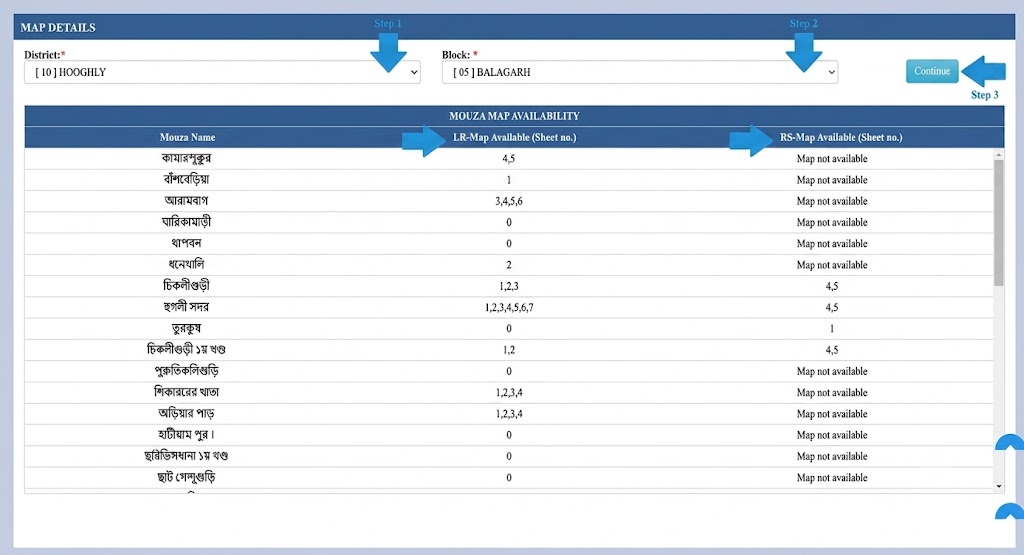
How to Check Mouza Map Availability Online (Banglarbhumi)
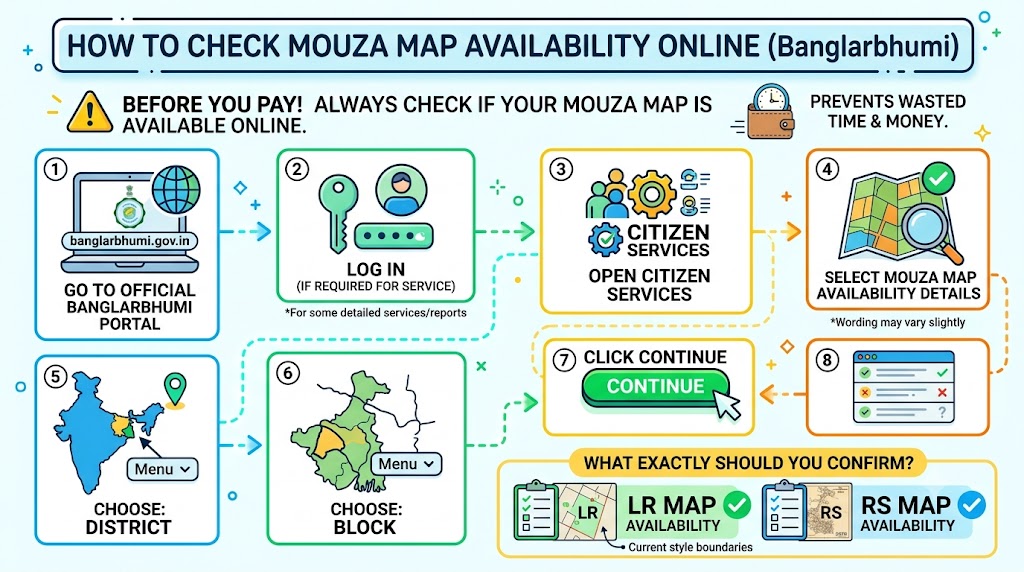
Before you pay any fee, always check if your Mouza map is actually available online. This prevents wasted time.
Steps to check Mouza map availability
- Go to the official Banglarbhumi portal.
- Log in (if required for the service you’re using).
- Open Citizen Services.
- Select Mouza Map Availability Details (wording may vary slightly).
- Choose:
- District
- Block
- Click Continue.
- You’ll see a list of Mouzas and whether maps are available.
What exactly should you confirm
- LR map availability
- RS map availability
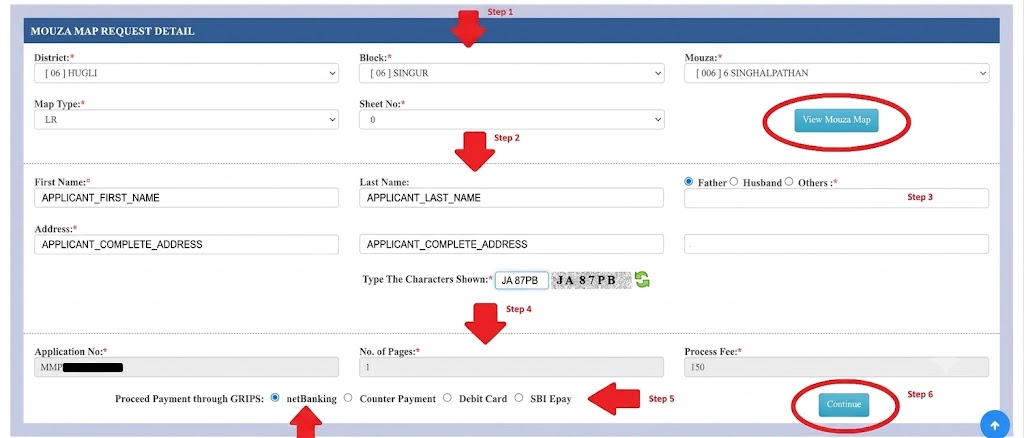
How to Request a Mouza Map with Plot Number on Banglarbhumi (Step-by-step 2026)
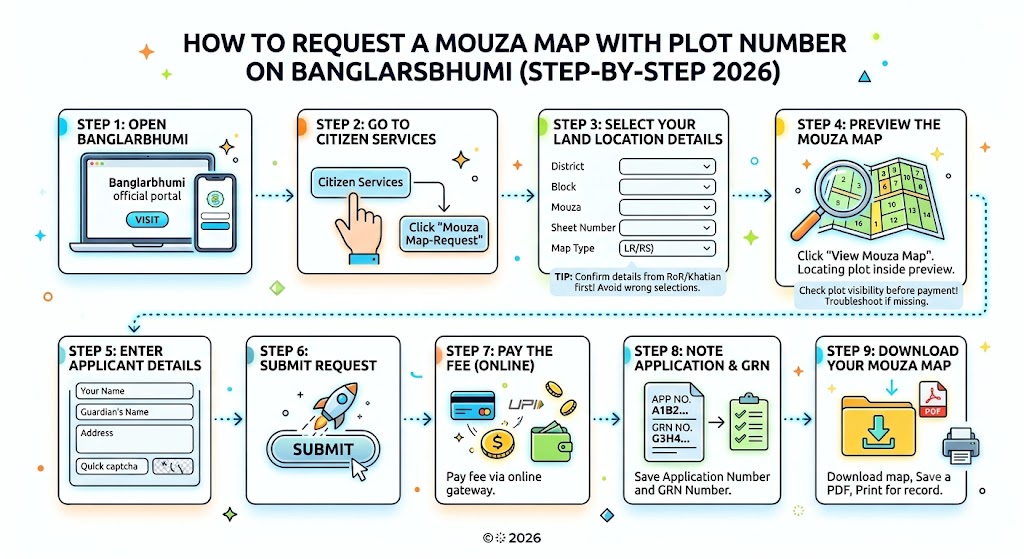
This is the exact flow that works most consistently.
Step 1: Open Banglarbhumi
- Visit the official Banglarbhumi land records portal.
Step 2: Go to Citizen Services
- Click Citizen Services
- Choose Mouza Map Request (or “Mouza Map-Request”)
Step 3: Select your land location details
Fill in:
- District
- Block
- Mouza
- Sheet Number
- Map Type: LR or RS
Tip from my experience: If you’re confused between two similar Mouza names, confirm from your RoR/Khatian first. One wrong selection will show a completely different map.
Step 4: Preview the Mouza Map
- Click View Mouza Map
- Use the Plot Number to locate your plot inside the map preview
If the plot number is not visible, go to the troubleshooting sections below. Don’t pay first if the preview itself looks wrong.
Step 5: Enter applicant details
You’ll typically need:
- Your name
- Guardian’s name (as asked)
- Address
- Captcha
Step 6: Submit request
- Click Submit
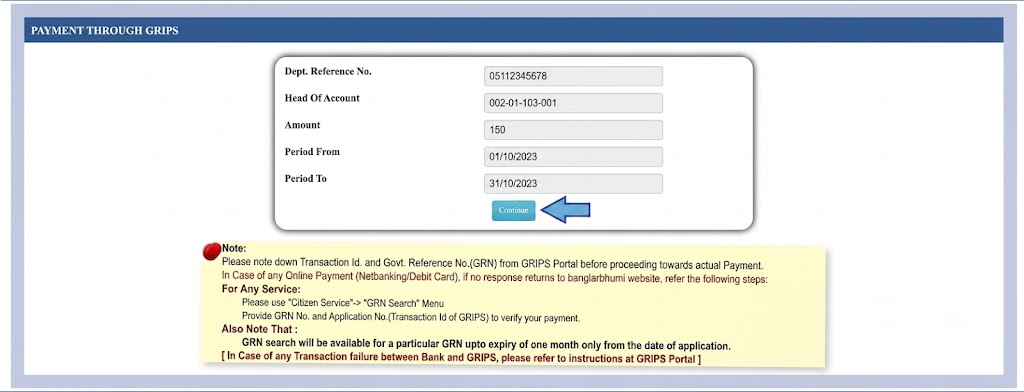
Step 7: Pay the fee (online)
- Pay the fee using the payment gateway.
Step 8: Note your Application Number and GRN
After successful payment, you’ll receive:
- Application Number
- GRN Number (Government Reference Number)
Step 9: Download your Mouza map
Use the Application/GRN details to:
- Download the map
- Save a copy as a PDF (if the portal allows)
- Print for record
Fees, Payment, Download (What the numbers mean)
Important fee details (2026)
| Service | Fee |
|---|---|
Mouza Map Request Fee | Rs 150 |
Fees can be updated by the department, but Rs 150 is the commonly displayed charge for this service in the current flow.
What is GRN and why should you care
| Item | What It Is | Why It Matters |
|---|---|---|
Application Number | Your request ID | Used to retrieve/download and track |
GRN Number | Payment reference ID | Proof of payment, useful if download fails |
My practical advice: Screenshot the payment success page. If your download fails later, these details save you.
Pick the Application Mode: Online vs Offline
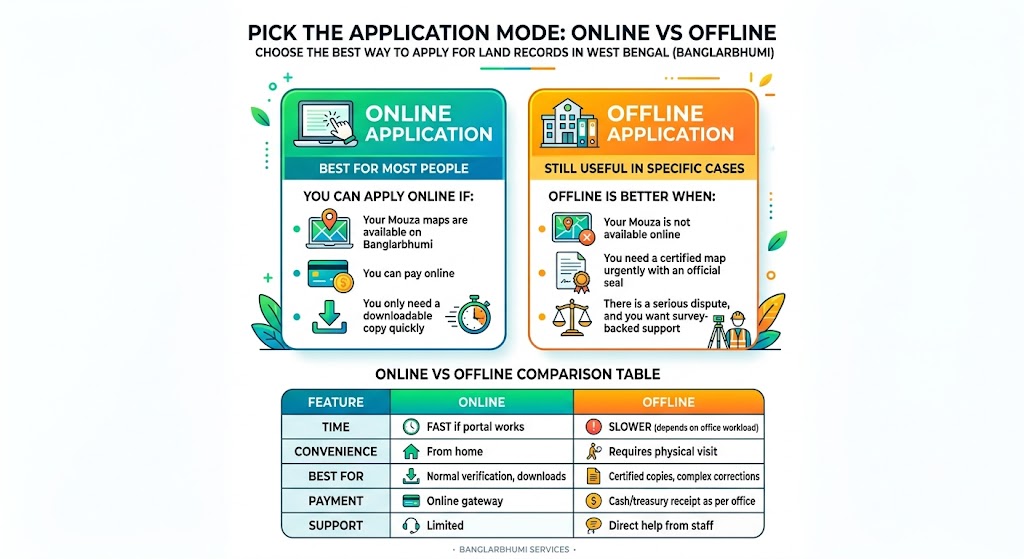
Online application (best for most people)
You can apply online if:
- Your Mouza maps are available on Banglarbhumi.
- You can pay online
- You only need a downloadable copy quickly.
Offline application (still useful in specific cases)
Offline is better when:
- Your Mouza is not available online.
- You need a certified map urgently with an official seal.
- There is a serious dispute, and you want survey-backed support.
You can visit:
- BL&LRO office / Land Records Office (local)
- Tehsil-style revenue office setup (depending on local structure)
- CSC (Common Service Centre) if you want an operator-assisted application
Online vs Offline Comparison Table
| Factor | Online | Offline |
|---|---|---|
Time | Fast if portal works | Slower (depends on office workload) |
Convenience | From home | Requires physical visit |
Best for | Normal verification, downloads | Certified copies, complex corrections |
Payment | Online gateway | Cash/treasury receipt as per office |
Support | Limited | Direct help from staff |
Data and Documents Required (Online or Offline)
Required data/documents list (recommended to keep ready)
| Document | Why It's Needed |
|---|---|
RoR / Khatian copy (reprint) | Confirms plot number, owner link, record reference |
Registered deed copy (if available) | Ownership chain support |
ID proof (Aadhaar/PAN/Voter ID) | Applicant verification (often needed offline) |
Address proof (utility bill/ration card etc.) | Applicant details (mainly offline) |
Application form (offline) | Official request submission |
Fee receipt / payment reference | Proof if download is delayed or fails |
If you’re applying for legal or banking work, don’t rely only on a normal download. Ask for a certified copy where required.
Common Issues and Solutions (Real fixes)
Here are the problems I see most often and what actually works.
Troubleshooting Table
| Issue | Likely Cause | Fix |
|---|---|---|
Plot not found | Wrong Mouza/Sheet, old plot number, data not synced | Recheck RoR/Khatian, confirm Sheet No, try LR/RS both |
Portal not loading / technical error | Browser cache, traffic, gateway issues | Try another browser, clear cache, use off-peak hours |
Payment success but download not working | Session timeout or redirect issue | Use Application No + GRN later, check download section again |
Owner name mismatch | Mutation pending or record not updated | Apply for mutation/correction through office/portal |
Map is blurry | Low-resolution render | Request certified copy or GIS version (if available) |
Captcha fails repeatedly | Browser issue | Refresh page, switch browser, avoid auto-fill |
How to Fix Missing Plot Numbers on Banglarbhumi Mouza Map
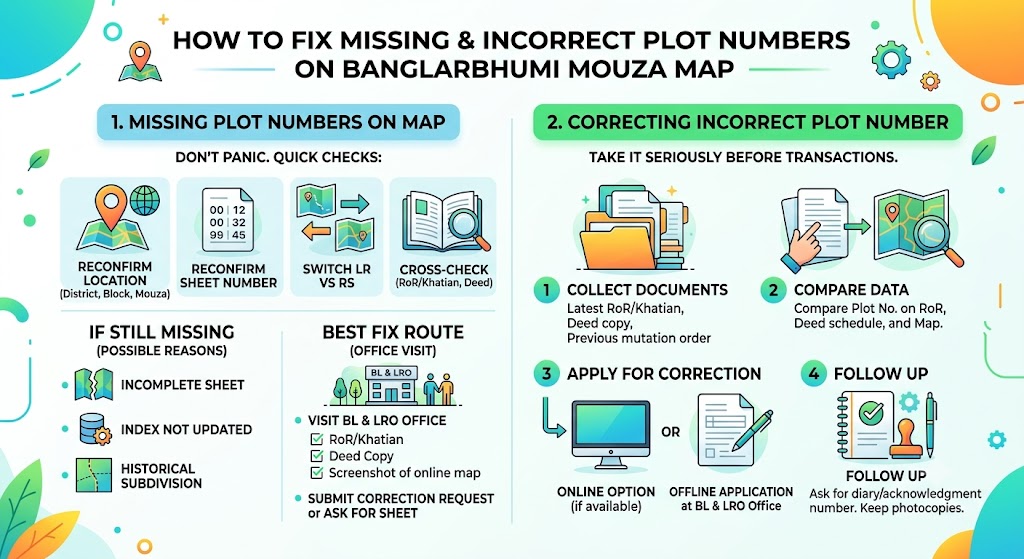
If your plot number is not showing on the map, don’t panic. This happens.
What I do first (quick checks)
- Reconfirm District, Block, Mouza
- Reconfirm Sheet Number
- Switch between LR and RS to see if one shows the plot clearer.
- Cross-check plot number from:
- RoR/Khatian
- Deed schedule description
If still missing: what it usually means
- The sheet uploaded online is incomplete.
- Plot indexing is not updated.
- A subdivision/renumbering happened historically.
Best fix route
- Visit BL&LRO offices with:
- RoR/Khatian
- Deed copy
- Screenshot/print of the online map showing the missing plot
- Submit a correction request or ask for the correct sheet reference.
Step-by-Step: Correcting Incorrect Plot Numbers on Mouza Map
If the plot number shown is incorrect (or points to a different parcel), take it seriously before any transaction.
Correction steps
- Collect documents:
- Latest RoR/Khatian
- Deed copy
- Any previous mutation order
- Compare:
- Plot number on RoR
- Plot number on deed schedule
- Plot shown on the map
- Apply for correction:
- Online correction feature, if available for your service area, or
- Offline written application at the BL&LRO office
- Follow up:
- Ask for a diary/acknowledgment number.
- Keep photocopies of all submissions.
Can a Mouza Map show historical changes in plot boundaries?
A single Mouza map typically shows a snapshot, not a timeline.
But you can still understand historical change by comparing:
- RS map (older reference)
- LR map (more recent reference)
- Current RoR entries
If you’re dealing with an old family property where the land was subdivided multiple times, this comparison is extremely useful.
Plot Number vs Dag No vs Khatian (simple explanation)
This confusion is very common, so here’s the clear explanation.
| Term | Meaning | Purpose |
|---|---|---|
Plot Number | Number assigned to a land parcel in a Mouza map | Locate the exact parcel on the map |
Dag No | Commonly used term for Plot Number (often used interchangeably) | Same practical purpose as plot number |
Khatian | Record of Rights (RoR) record grouping plots with ownership and rights | Proves recorded ownership, rights, taxes, classification |
In short:
- Plot/Dag tells you “where the land is on the map”
- Khatian (RoR) tells you “who it belongs to and what rights exist”
Boundary disputes: How to resolve using Mouza Map
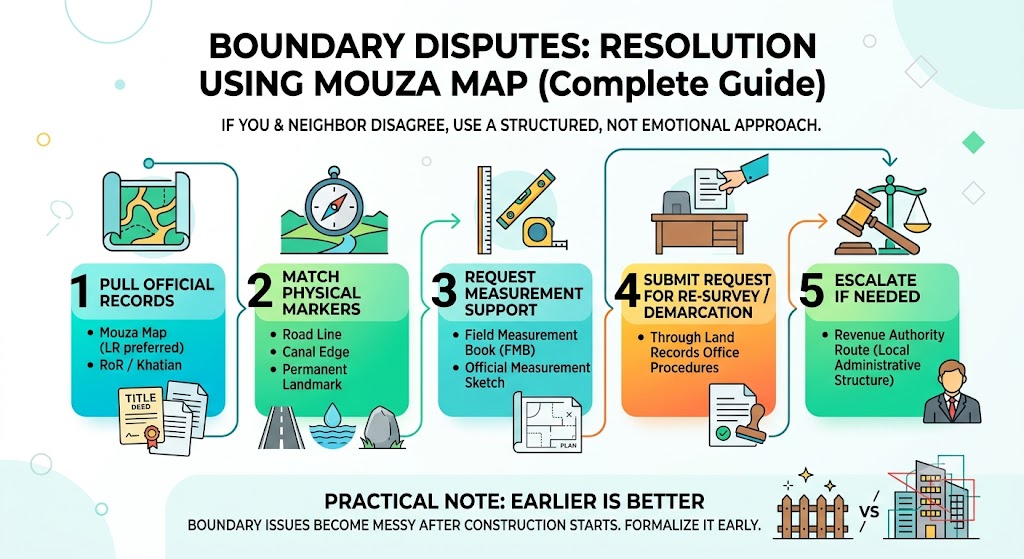
If you and a neighbor disagree on the boundary, your best approach is structured, not emotional.
Step-by-step dispute approach
- Pull official records:
- Mouza map (LR preferred)
- RoR/Khatian
- Match physical markers:
- Road line, canal edge, permanent landmark
- Request measurement support:
- Ask for the Field Measurement Book (FMB) or an official measurement sketch (where applicable)
- Submit request for re-survey or demarcation:
- Through the land records office procedures
- Escalate if needed:
- Revenue authority route (as per your local administrative structure)
Practical note: The earlier you formalize it, the easier it is to resolve. Boundary issues become messy after construction starts.
Is a Mouza Map valid as legal proof of ownership in court
A Mouza map is very strong for location and boundary support, but ownership is generally proven through:
- RoR/Khatian (certified)
- Registered deed
- Mutation and tax receipts (supporting documents)
Best legal combination
| Document | Legal Strength |
|---|---|
Certified RoR/Khatian | High |
Registered deed | High |
Certified Mouza map | Strong supporting evidence for boundaries |
Tax receipt | Supporting evidence |
So yes, Mouza map helps a lot, but don’t treat it as the only ownership proof.
Symbols and Annotations on Mouza Map (what they usually mean)
Most people download the map and then get stuck because of the symbols. While legends can vary by sheet, here are common items you’ll see.
Common Mouza Map Symbols Table (General)
| Symbol | What It Represents |
|---|---|
Thick boundary line | Mouza boundary or major division |
Thin plot lines | Individual plot boundaries |
Plot numbers | Parcel identifiers (your key reference) |
Double lines | Road/embankment (varies by map) |
Blue-marked areas (in some prints) | Water body, canal, pond |
Dashed lines | Survey/reference lines or subdivisions |
If your map sheet includes a legend box, follow that first. When in doubt, compare with nearby known landmarks.
How to track Mouza map application status (even if the portal shows an error)
If the portal throws an error while tracking:
What you should try first
- Use Application Number
- Use the GRN Number if payment-related
- Clear the cache or open in another browser
- Try again in non-peak hours.
If still not working
- Contact the Banglarbhumi help/support section (if listed)
- Visit your nearest CSC and ask them to check using the Application/GRN.
- Offline follow-up at BL&LRO with printed payment proof
How to obtain a high-resolution Mouza map if the download is blurry
Blurry maps are a real problem, especially when plot numbers are tiny.
Best solutions
- Download again using a desktop (not mobile)
- Try an alternative format if the portal offers a GIS-based view.
- Request a certified copy (often clearer)
- Offline, request a printed/scanned high-resolution sheet from the land records office
If you need the map for the bank or court, go for a certified copy to avoid objections.
FAQs
What is the official process for applying for the Mouza map for a particular area or village?
You can apply:
- Online: Banglarbhumi portal, Citizen Services, Mouza Map Request, fill details, pay fee, download.
- Offline: Visit BL&LRO / land records office, submit form with documents and fees, collect acknowledgment.
What documents are needed to submit a Mouza map or plot number application?
Typically:
- RoR/Khatian (recommended)
- Deed copy (recommended)
- ID proof (often needed offline)
- Address proof (offline)
- Payment receipt or treasury receipt
How long does it take to receive a Mouza map after submitting a request?
Online downloads are often immediate after successful payment, but delays can happen due to portal load or processing. Offline timelines depend on the office workload and whether you request a certified copy.
Can I apply for a Mouza map without knowing the plot number?
Yes. You can open the Mouza map by selecting District, Block, Mouza, and Sheet, then visually locate the plot and cross-check with RoR/Khatian to confirm.
Can I request a certified copy of the Mouza map?
Yes. If you need it for court, bank, or official submissions, a certified copy is the safest option.
What is the fee for applying for a Mouza map?
The commonly displayed fee is Rs 150 for the online request (subject to official updates).
How do I check the availability of a specific Mouza map?
Use the Banglarbhumi “Mouza Map Availability Details” option under Citizen Services, then select District and Block.
What should I do if the plot is not found in the system?
Recheck Mouza and Sheet No, confirm plot number from RoR/Khatian, try LR/RS both. If still missing, visit BL&LRO office with documents and request correction or guidance.
Can I track the status of my Mouza map application?
Yes. Use your Application Number and GRN. If portal errors occur, try another browser or follow up via CSC/office with payment proof.
Final Thoughts
A Mouza Map with Plot Number is one of the smartest documents you can keep ready in 2026 because it protects you from wrong-boundary claims, mismatched plot details, and risky purchases. If your Mouza is available online, Banglarbhumi is the fastest route. If anything looks off (missing plot, mismatch, blurry sheet), don’t force it, verify with RoR/Khatian, then escalate to BL&LRO for correction or certified copies.