How to Apply for Mutation Online in West Bengal for Free (Latest 2026 Method)
If you’ve recently bought land, inherited property, received a gift deed, or completed a family settlement, mutation is the next step you should not skip. Mutation updates the government land record (Record of Rights) so your name appears against the plot and khatian, which is essential for taxes, future sale, and most bank-related work.
In this guide, I’ll tell you how to apply for mutation and what to do after it.
Official portal: https://banglarbhumi.gov.in
What is a mutation of Property?
Mutation is the official process of updating land ownership details in government records after a transfer.
Even if you already have a registered deed, mutation is what updates:
- Khatian / Record of Rights (RoR)
- Plot ownership entries
- Taxpayer details for land revenue or local taxes (as applicable)
Think of it like this: your deed proves the transaction, but mutation ensures government land records reflect that change.
When You Must Apply for Mutation
You should apply for mutation when ownership changes due to:
- Purchase of land/property (registered sale deed)
- Inheritance (death of recorded owner)
- Gift deed transfer
- Partition / family settlement
- Court order affecting ownership
- Exchange deed or relinquishment deed (where applicable)
Benefits of Online Mutation on Banglarbhumi
From a practical standpoint, online mutation helps you avoid repeated office visits and gives you a trackable reference number.
Key benefits
- Time saving
You avoid multiple trips just to “submit and check.” - Transparent tracking
You can see status updates using case/deed/location details. - Less paperwork chaos
Uploading documents in one place reduces missing-page issues. - Better readiness for loans and resale
Banks often ask for updated RoR/mutation status before processing property loans.
Before You Apply (Quick Checklist)
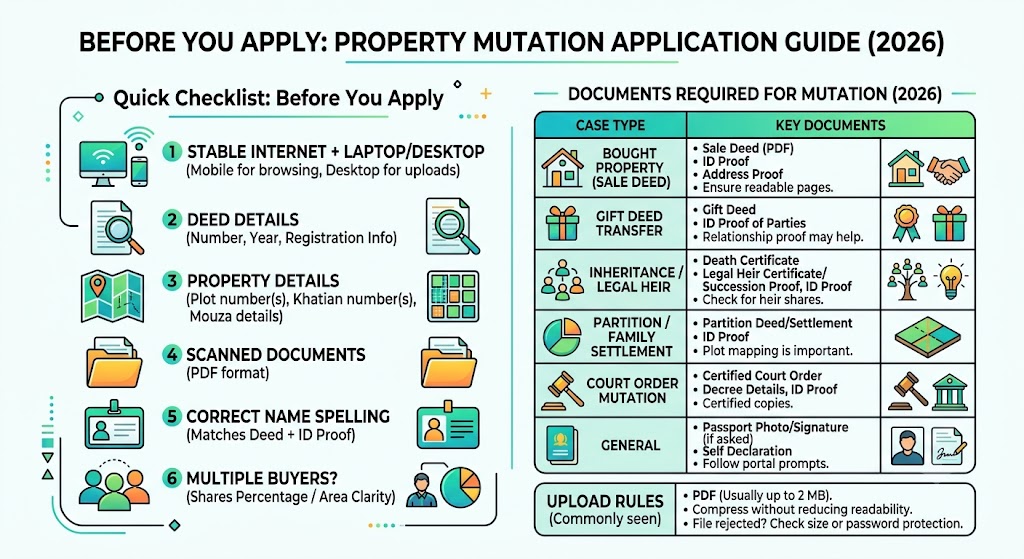
Before you start the online application, keep this ready:
- Stable internet + laptop/desktop (mobile works, but desktop is easier for uploads)
- Deed details (number, year, registration info)
- Plot number(s), khatian number(s), mouza details
- Scanned documents in PDF
- Your correct name spelling exactly as in deed + ID proof
- If multiple buyers: share percentage / share area clarity
Documents Required for Mutation (2026 Updated Table)
Exact requirements can vary by case type (sale vs inheritance vs gift), but the documents below are the most commonly asked on the portal and at verification.
Document checklist table
| Case Type | Documents Needed | Tip |
|---|---|---|
Bought property (Sale Deed) | Registered sale deed (PDF), ID proof, address proof | Ensure deed pages are complete and readable |
Gift deed transfer | Registered gift deed, ID proof of parties | Sometimes relationship proof may help |
Inheritance / legal heir | Death certificate, legal heir certificate/succession proof (as applicable), ID proof | If multiple heirs, ensure clarity on shares |
Partition / family settlement | Registered partition deed/family settlement deed, ID proof | Plot mapping clarity matters a lot |
Court order mutation | Certified court order, decree details, ID proof | Upload certified copies |
General | Passport photo/signature (if asked), self declaration | Follow portal prompts |
Upload rules (commonly seen)
| File Type | Size Limit | Tip |
|---|---|---|
Usually up to 2 MB per file | Compress without reducing readability |
If the portal rejects a file, it’s usually due to size or password-protected PDFs.
Step-by-Step: Apply for Land Mutation Online in West Bengal (Banglarbhumi 2026)
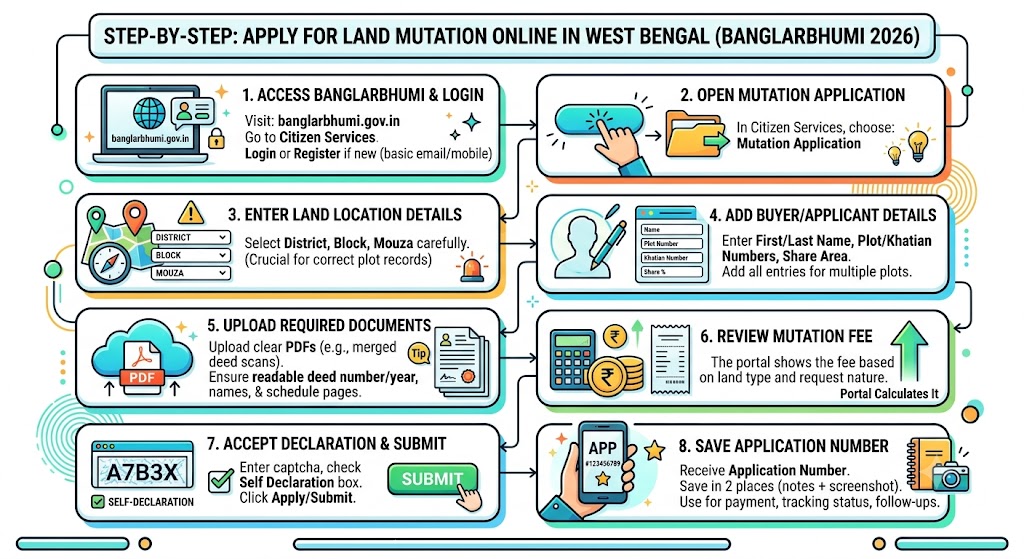
Here’s the clean step flow you should follow.
Step 1: Go to Banglarbhumi and Login
- Visit: banglarbhumi.gov.in
- Go to Citizen Services
- Login using your credentials
If you’re new, you may need to register first (basic mobile/email verification steps may apply depending on current portal settings).
Step 2: Open Mutation Application
Inside Citizen Services, choose:
Mutation Application
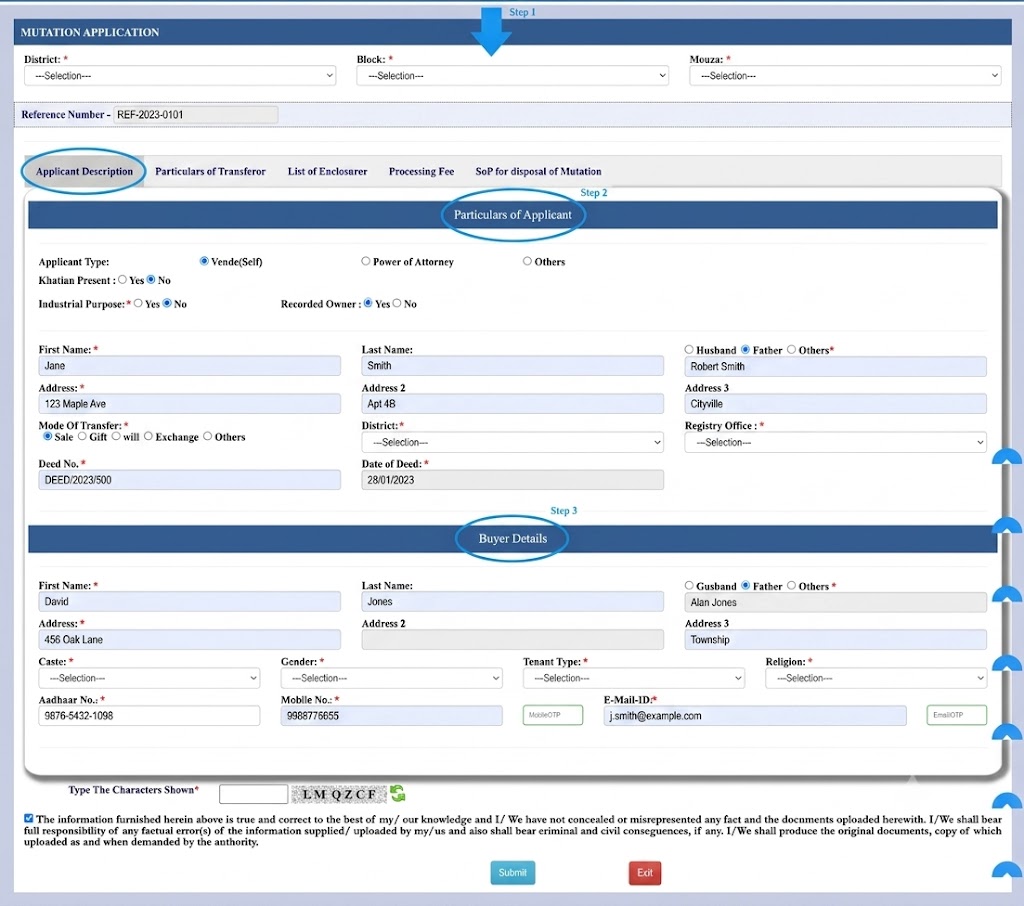
Step 3: Enter Land Location Details
Select the land location carefully:
- District
- Block
- Mouza
This is the part where most people make mistakes. If the mouza is wrong, your plot list and records won’t match.
Step 4: Add Buyer Details (Your Details)
Typically asked fields include:
- First Name / Last Name
- Plot Number
- Khatian Number
- Share Area / Share Percentage (if applicable)
If there are multiple plots, add each plot entry carefully.
Step 5: Upload Documents (PDF)
Upload the required documents in PDF format within size limits.
My practical tip: merge multi-page deed scans into one clean PDF and ensure:
- deed number/year is readable
- parties’ names are readable
- schedule/property description pages are included
Step 6: Review the Mutation Fee (Portal Calculates It)
The portal will show the fee based on land type/classification and the nature of request.
Step 7: Captcha + Self Declaration + Submit
- Enter captcha
- Accept Self Declaration
- Click Apply/Submit
Step 8: Save the Application Number
After submission, you’ll receive an Application Number.
Save it in at least two places (notes + screenshot). You’ll need it for:
- fee payment (if pending)
- tracking status
- follow-ups
Mutation Fees: What It Depends On (And How to Avoid Surprises)
Mutation fees are not “one flat amount” in many cases. The portal generally determines fees based on factors like:
- land classification/type
- area/share
- transaction type
Fee clarity table
| Factor | What It Depends On |
|---|---|
Land type/classification | Agricultural vs non-agricultural (as per records) |
Share | Full owner vs partial share mutation |
Number of plots/khatian entries | More entries can mean more processing complexity |
Important: I’m not listing exact rupee amounts here because fees can be revised and may differ by scenario. Always rely on the fee shown inside the official portal at the time you apply.
How to Track Mutation Plot / Khatian Status (Plot Wise or Khatian Wise)
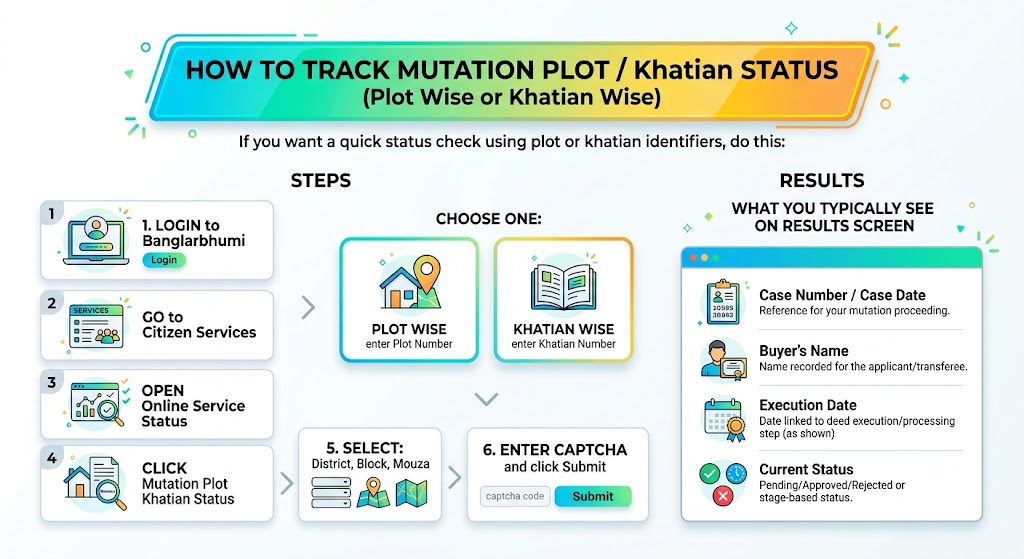
If you want a quick status check using plot or khatian identifiers, do this:
Steps
- Login to Banglarbhumi
- Go to Citizen Services
- Open Online Service Status
- Click Mutation Plot Khatian Status
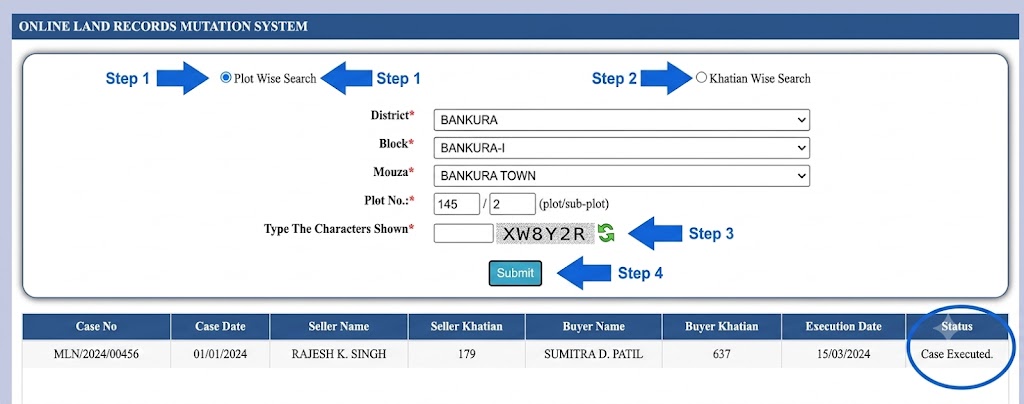
- Choose one:
- Plot Wise (enter Plot Number)
- Khatian Wise (enter Khatian Number)
- Select:
- District
- Block
- Mouza
- Enter captcha and click Submit
What you typically see on results screen
| Field | What It Shows |
|---|---|
Case Number / Case Date | Reference for your mutation proceeding |
Buyer’s Name | Name recorded for the applicant/transferee |
Execution Date | Date linked to deed execution/processing step (as shown) |
Current Status | Pending/Approved/Rejected or stage-based status |
How to Check Mutation Status Online (Case, Deed, Location, Seller/Buyer Name Wise)
Banglarbhumi usually offers multiple ways to search mutation status (helpful when you don’t have plot/khatian handy).
Steps
- Open Banglarbhumi homepage and login
- Go to Citizen Services
- Click Online Service Status
- Select Mutation Status
Available search types (and what you’ll need)
| Search Type | What You'll Need |
|---|---|
Case Wise | Case number + date |
Deed Wise | Deed number + year |
Location Wise | District + Block + Mouza |
Seller Name Wise | Seller name + address (as required) |
Buyer Name Wise | Buyer name + address (as required) |
After entering details:
- complete captcha
- click Submit
- view status and, where available, download/save the result
Status result usually includes
| Field | What It Shows |
|---|---|
Deed details | Confirms you’re tracking the right transaction |
Party name/address | Helps identify matching record |
Status | Tells you the current stage |
Venue, Date & Time | If hearing/verification is scheduled |
What Happens After You Submit the Mutation Request?
Online submission is the start. After that, the file usually moves through verification stages.
Typical post-submission flow
- Document verification
Office checks deed details, identity, and record matching. - Field inspection (if required)
Sometimes a revenue official may verify possession, boundary clarity, or dispute risks. - Objection/notice window (if applicable)
If the process requires public notice and someone objects, the case may pause. - Approval and record update
Your name gets updated in the land record. - Mutation certificate
After approval, you may be able to download the certificate online or collect it as per local process.
Why Mutation Applications Get Delayed (Even After Uploading Documents)
This is one of the most common frustrations. In my experience reviewing mutation issues people face, delays usually happen for predictable reasons.
Delay reasons and fixes
| Reason | Cause | Fix |
|---|---|---|
Name mismatch across documents | Spelling differs in deed vs ID vs portal entry | Use exact deed spelling; apply correction if needed |
Wrong mouza/block selection | Plot/khatian doesn’t fetch correctly | Re-check RoR details and reapply if required |
Poor scan quality | Blurry deed pages | Re-upload clearer PDF within size limit |
Multiple owners/share confusion | Shares not clearly entered | Upload supporting share document/clarification |
Objection filed | Status stuck due to dispute | Follow venue/date/time; submit supporting proof |
Verification backlog | No update for weeks | Use case/application number to follow up at concerned office |
Mutation Correction vs Revision (Legal Difference)
People mix these two up. They’re not the same.
Difference table
| Aspect | Correction | Revision |
|---|---|---|
Meaning | Fixes clerical/typing/data-entry mistakes | Re-assessment due to new evidence, dispute, or legal direction |
Typical examples | Misspelling name, wrong plot digit | Fraud claim, competing ownership claim, court order update |
Complexity | Usually simpler | More formal and may involve hearings |
Proof needed | Supporting documents showing correct data | Strong evidence, legal documents, orders, affidavits |
Important Topics People Ask About (Clear Answers)
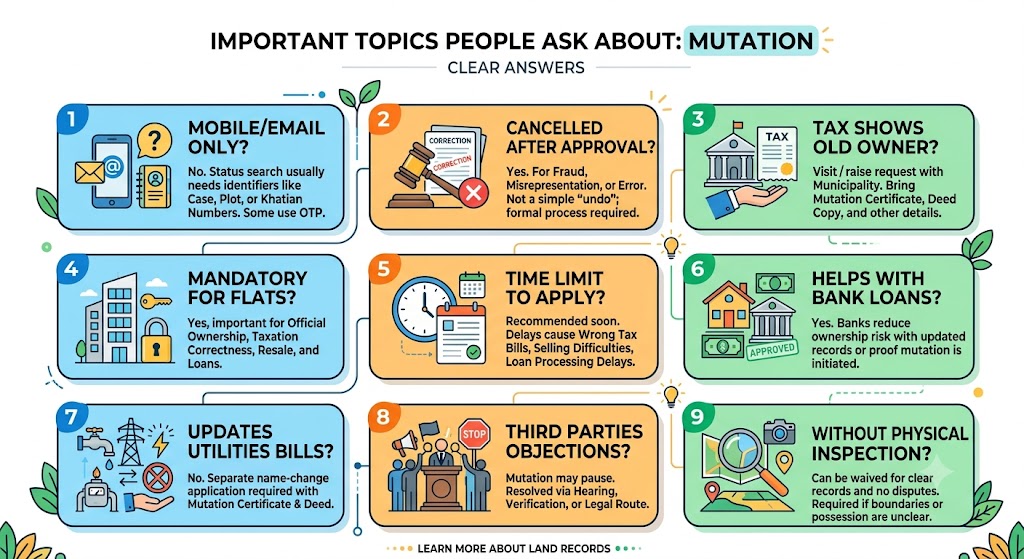
Can I check mutation status using mobile number or email only?
Most land record systems still require identifiers like case number, deed number, plot number, or khatian number. Some systems may use OTP login, but status search usually needs record identifiers.
Can mutation be cancelled or reversed after approval?
If fraud, misrepresentation, or major error is proven, authorities can initiate correction/revision procedures. This is not a simple “undo” button; it usually requires formal process and supporting proof.
Mutation completed but municipal tax still shows old owner. What to do?
Mutation updates land records, but municipal tax databases may not auto-sync everywhere. Visit/raise request with:
- mutation certificate
- deed copy
- identity proof
- tax holding details (if applicable)
Is mutation mandatory for flats in housing societies?
Even if the society updates its internal register, mutation in government/municipal records is still important for:
- official ownership recognition
- taxation correctness
- resale and loan documentation
Is there a time limit to apply for mutation after transfer?
Many places recommend applying soon after transfer (often within a few weeks/months). Even when not strictly penalized, delays can cause:
- wrong tax billing
- difficulties in selling
- loan processing delays
Does mutation help with bank loans?
Yes. Banks frequently want updated records or proof that mutation is initiated/approved to reduce ownership risk.
Does mutation automatically update electricity/water/gas bills?
No. Mutation updates land records. Utilities usually require a separate name-change application with:
- mutation certificate
- deed
- meter/customer details
What if third parties file objections?
If objections are raised during the notice period, mutation may pause until the matter is resolved through hearing, verification, and/or legal route.
Can mutation happen without physical inspection?
If it’s a straightforward update with clear records and no disputes, inspection may be waived. But officials can still inspect where boundaries/possession are unclear or objections exist.
Mutation Procedures Across States (West Bengal vs UP vs Odisha)
If you own property in multiple states, don’t assume the steps are identical.
| State | Portal | Key Identifiers | Notes |
|---|---|---|---|
West Bengal | Banglarbhumi | Plot, Khatian, Mouza | Strong citizen-service tracking options |
Uttar Pradesh | UP Bhulekh (land records) | Gata/Khatauni (varies by system) | Local तहसील processes can still matter |
Odisha | Odisha Bhulekh / state land records | Plot, Khata | Process and forms differ by district |
In rural regions, these portals are especially helpful because they reduce dependency on repeated office visits just for status checks.
FAQs
How long does the mutation process take?
It depends on verification load, objection status, and record clarity. Straightforward cases can move faster, while disputes and data mismatches take longer.
Can mutation be applied for commercial properties?
Yes, mutation is relevant wherever ownership records need updating, including commercial property, subject to local rules and classification.
Can I apply for mutation if the property is mortgaged or under dispute?
If it’s under dispute, mutation may be held until resolution. For mortgaged property, the bank’s interest may matter depending on transaction type. Always ensure your deed/transfer is legally valid before mutation.
Do I need to visit the local office if I apply online?
Not always. But you may be called for:
- verification
- hearing (if objections)
- document clarification
- certificate collection (if download is not enabled)
A quick note on “mutation in CMS (content management systems)”
Some articles mix the term “mutation” in land records with “mutation” in software/CMS updates. They are completely different topics. For land mutation, focus only on revenue/land record processes and the official portal.
Final Advice (So Your Application Doesn’t Get Stuck)
If you want your mutation to move smoothly, do these 5 things:
- Match spelling exactly (deed, ID, application form)
- Select correct district-block-mouza before entering plot/khatian
- Upload clean PDFs (readable, complete, under size limit)
- Keep your application/case number safe for tracking
- Track status weekly and respond quickly if venue/date/time appears